Office 2024 comes in four one-time-purchase editions, and the only real differences between them are which apps you get, whether a Mac version exists, and how the license is sold. Professional Plus is the only edition with Access; Standard drops Access but keeps Outlook; Home & Business is the retail PC-or-Mac edition with Outlook; Home is the retail edition without Outlook. Everything else, including the Word, Excel and PowerPoint you use daily and the October 9, 2029 end-of-support date, is the same. This comparison puts the four side by side, then gives you a decision table so you can stop reading as soon as your situation appears.
Key takeaways
- Need Access? Professional Plus is the only Office 2024 edition that includes it. If you need nothing else, the standalone Access 2024 is an alternative.
- Need Outlook but not Access? Standard (volume-licensed, Windows) or Home & Business (retail, Windows or Mac).
- On a Mac? Professional Plus and Standard do not exist for macOS. Home & Business 2024 is the one-time-purchase choice.
- No Office 2024 edition includes Publisher or Teams.
- All four editions receive security updates until October 9, 2029 and receive no new features after release.
Contents
- The four editions at a glance
- Decision table: which edition fits you
- Who actually needs Access
- Professional Plus vs Standard
- Professional Plus vs Home & Business
- Retail vs volume-licensed: what “LTSC” means for you
- Several PCs
- Office 2024 vs Microsoft 365, briefly
- Frequently asked questions
- Sources
The four editions at a glance
| Professional Plus 2024 | Standard 2024 | Home & Business 2024 | Home 2024 | |
|---|---|---|---|---|
| Word, Excel, PowerPoint, OneNote | ✔ | ✔ | ✔ | ✔ |
| Outlook | ✔ | ✔ | ✔ | — |
| Access | ✔ | — | — | — |
| Publisher | — | — | — | — |
| Teams | Separate download | Separate download | — | — |
| Platform | Windows | Windows (a separate “Office LTSC Standard for Mac 2024” exists for volume customers) | Windows or Mac | Windows or Mac |
| License type | Volume (Microsoft name: Office LTSC Professional Plus 2024) | Volume (Office LTSC Standard 2024) | Retail, one PC or Mac | Retail, one PC or Mac |
| How you install | Office Deployment Tool, files from Microsoft | Office Deployment Tool | Redeem key at Microsoft, download from your Microsoft account | Same as Home & Business |
| Microsoft account needed | No | No | Yes, to redeem | Yes, to redeem |
| Security updates until | October 9, 2029 | October 9, 2029 | October 9, 2029 | October 9, 2029 |
| Kymakers | Pro Plus key · 5 PC pack | Standard key | Home & Business key | Not sold at Kymakers |
Microsoft documents the volume-licensed app lists on its Office LTSC 2024 overview page and the retail editions on its Office 2024 product pages; both are in the sources. Note the naming: Microsoft’s retail edition without Outlook is called “Office Home 2024”, not “Home & Student” as in earlier years.
Decision table: which edition fits you
| Your situation | Buy | Why |
|---|---|---|
| You build or use Access databases (customer lists, inventory, invoicing front-ends, legacy .accdb files) | Professional Plus | Only edition with Access |
| You need Access only, and already have Word and Excel from another suite | Access 2024 standalone | Cheaper than a second suite if the rest is covered |
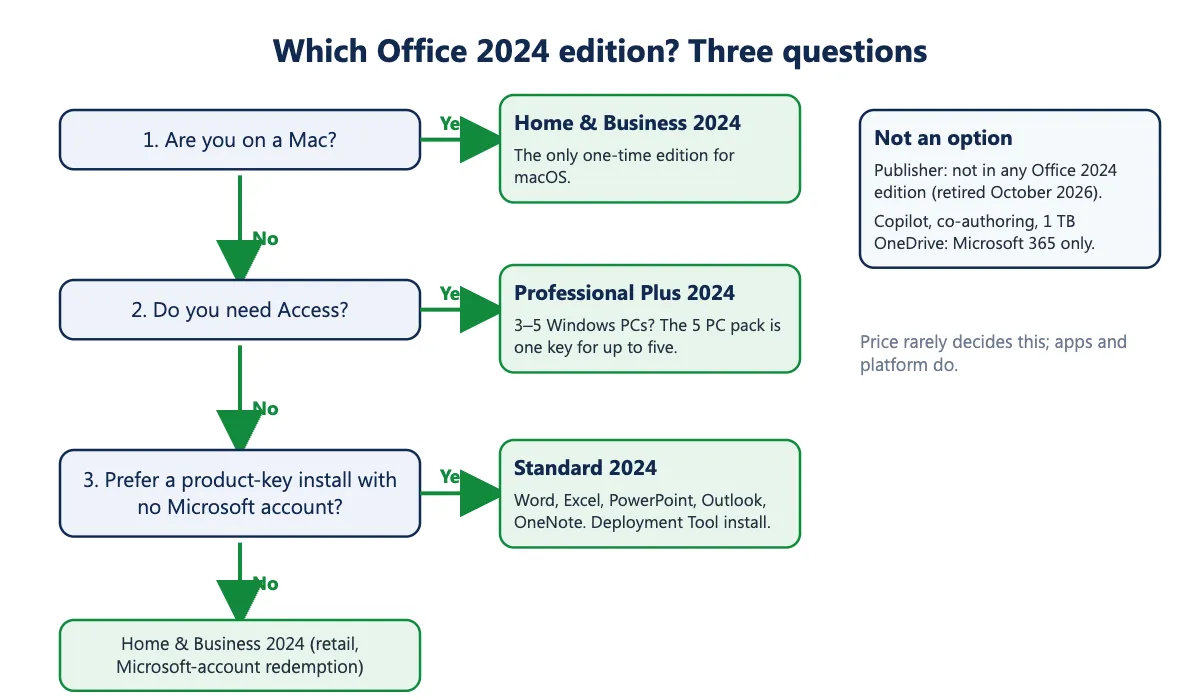
| Windows PC, you want Outlook, you never open Access | Standard | Same five apps as Home & Business, no Microsoft account, volume install |
| Windows PC, you want the retail edition that redeems through a Microsoft account | Home & Business | Retail flow; reinstall from your Microsoft account |
| Mac | Home & Business | Professional Plus and Standard are Windows-only |
| You need Visio or Project as well | Pro Plus + Visio + Project 2024 bundle | One order, one install session |
| Three to five Windows PCs in one household or office | 5 PC pack | One key, up to five activations |
| New PC that also needs Windows | Windows 11 Pro + Office 2024 Pro Plus bundle | Both licenses in one order |
| You need Publisher | None of the above | Publisher is not in any Office 2024 edition and reached end of life in October 2026; keep an existing Publisher 2021 install for old files or export them to PDF |
| You want Copilot, real-time co-authoring, or 1 TB of OneDrive | Microsoft 365 | Office 2024 does not include cloud services; see the subscription comparison |
Price is the other variable. At Kymakers the Professional Plus key is currently priced below the Standard and Home & Business keys; check the product pages for today’s figures. That means price rarely decides this: pick the edition by apps and platform.
Who actually needs Access
Access is a desktop database: tables, queries, forms and reports in one file, with VBA for automation. People need it when they inherit an .accdb or .mdb file from a predecessor, when a small business tracks customers or stock in something more structured than a spreadsheet, when a form-driven front end for a SQL Server or SharePoint list is in use, or when a department’s “little tool” was built in Access years ago and still runs the schedule. Access 2024 also adds a Dataverse connector for linking to Microsoft’s cloud tables.
You do not need Access for budgeting, invoicing from templates, mail merge, charts, pivot tables or anything else Excel already does. If you are not sure whether you need it, you do not; Excel covers it, and if a database turns up later the standalone Access 2024 can be added. Our article on what Microsoft Access is used for goes through the typical cases.
Two limits worth knowing before relying on Access: it is Windows-only (there is no Mac version), and it is a single-user-friendly tool that becomes awkward above a handful of simultaneous editors, which is where SQL Server or a web app takes over.
Professional Plus vs Standard
Both are volume-licensed Office LTSC 2024 editions, install with the same Office Deployment Tool, and need no Microsoft account. The only app difference is Access. The install guides are separate because the Product ID differs: Professional Plus install guide and Standard install guide. If you later need Access on a Standard PC, you can add the standalone Access 2024; it must match the architecture (32- or 64-bit) of the installed suite.
Professional Plus vs Home & Business
Three differences matter. Apps: Professional Plus adds Access. Platform: Home & Business runs on Windows or macOS; Professional Plus is Windows-only. Installation and account: Home & Business is a retail product redeemed at Microsoft’s setup site with a Microsoft account, after which Office downloads from that account and can be reinstalled from it; Professional Plus installs with the Deployment Tool and activates with the key, no account required. For a Windows user who will never open Access, the choice between them is about which installation and account model you prefer, not about features.
Retail vs volume-licensed: what “LTSC” means for you
Professional Plus and Standard are what Microsoft calls Office LTSC 2024, its Long-Term Servicing Channel release for organizations. “Long-term servicing” means the feature set is fixed at release and only security and quality updates follow, which is also true of the retail Home and Home & Business editions. Microsoft’s own summary of what LTSC does not include compared with Microsoft 365 Apps: real-time collaboration, AI-driven automation and the cloud-backed security and compliance features.
For a buyer, the practical consequences are: installation uses the Deployment Tool rather than a Microsoft-account download; activation uses the product key and does not require signing in; and the license terms are those of the volume product, not of a retail box. Activation succeeding tells you the key is valid; it does not by itself grant rights such as moving the license to a new PC. Kymakers’ delivery email states what your order covers and our refund and replacement policy covers a key that stops working. Our explainer on Office LTSC Professional Plus 2024 goes into the terminology.
Several PCs
Every single-PC edition above licenses one computer. For a home with several PCs or a small office, the Office 2024 Professional Plus 5 PC pack is one product key that can be activated on up to five Windows PCs; it is five computers, not five users, so a person with a desktop and a laptop uses two activations. Three PCs still fit the pack with two activations spare, and it is usually cheaper than three single keys. There is no multi-PC Standard or Home & Business pack at Kymakers; Microsoft’s retail editions are one device each.
Office 2024 vs Microsoft 365, briefly
Office 2024 is bought once and runs until you replace the PC or the apps stop receiving updates in 2029. Microsoft 365 is a subscription that adds cloud storage, Copilot features, continuous feature updates and multi-device installs, and that drops to reduced functionality when payment stops. If you need any of the cloud features, the subscription is the right product; if you want Word, Excel, PowerPoint, Outlook (and Access) on one PC for years, Office 2024 is cheaper over any period longer than a year or two. The full comparison, with Microsoft’s current prices and the assumptions behind the math, is in Office one-time purchase vs Microsoft 365.
Frequently asked questions
Does Office 2024 include Publisher? No edition does. Microsoft states that Publisher is not included with Office LTSC 2024, and Publisher reached its end of life in October 2026, when support for the perpetual version ended with Office LTSC 2021.
Does Office 2024 Professional Plus include Teams? Teams is not preinstalled with Office LTSC 2024. It is a free separate download from Microsoft, and the free Teams works with or without Office.
Is there an Office 2024 Professional Plus for Mac? No. The volume-licensed Mac product is Office LTSC Standard for Mac 2024, which has no Access. For a one-time purchase on a Mac, buy Home & Business 2024.
Standard or Home & Business for a Windows PC? Same five apps. Standard installs with the Deployment Tool and needs no Microsoft account; Home & Business redeems through a Microsoft account and can be reinstalled from it. Pick the installation model you prefer.
What is the difference between Office 2024 and Office LTSC 2024? Office LTSC 2024 is Microsoft’s name for the volume-licensed editions (Professional Plus and Standard). “Office 2024” without LTSC usually means the retail Home and Home & Business editions. The app versions are the same.
Can I upgrade Standard to Professional Plus later? Not with an upgrade key. You would install Professional Plus with its own key, which replaces Standard, or add the standalone Access 2024.
Which edition do students need? Almost always Home 2024 or Home & Business 2024 if they are on a Mac, or Standard or Professional Plus on Windows if a course requires Access. Our Office for students guide covers the free-through-school route too.
Sources
- Microsoft Learn, “Overview of Office LTSC 2024” (apps per edition, Publisher, Teams, Mac product, what LTSC does not include): https://learn.microsoft.com/en-us/office/ltsc/2024/overview
- Microsoft, “Get started with Office 2024” (Office Home 2024 and Office Home & Business 2024 contents and pricing): https://www.microsoft.com/en-us/microsoft-365/get-started-with-office-2024
- Microsoft Learn, “Office LTSC 2024 lifecycle”: https://learn.microsoft.com/en-us/lifecycle/products/office-ltsc-2024
- Microsoft Learn, “Office 2024 lifecycle”: https://learn.microsoft.com/en-us/lifecycle/products/office-2024
- Microsoft Support, “Microsoft Publisher will no longer be supported after October 2026”: https://support.microsoft.com/en-us/office/microsoft-publisher-will-no-longer-be-supported-after-october-2026-ee6302a2-4bc7-4841-babf-8e9be3acbfd7
- Microsoft Learn, “What’s new in Office LTSC 2024” (Access Dataverse connector): https://learn.microsoft.com/en-us/office/ltsc/2024/whats-new