Buying Office once or subscribing to Microsoft 365 is a question about what you need, not about which is “better”: the subscription includes cloud storage, Copilot, continuous feature updates and installs on several devices; the one-time purchase gives you the desktop apps on one computer for years at a fixed price and nothing else. This comparison sets out Microsoft’s current prices, states every assumption behind the math, and shows the break-even point for a single person, a family and a small office, so you can see which model costs less for the way you actually use Office.
Key takeaways
- Microsoft 365 Personal is $9.99 a month and Family is $12.99 a month on microsoft.com (prices read October 18, 2026); Office Home 2024 is $179.99 and Office Home & Business 2024 is $249.99 as one-time purchases.
- For one person on one PC, a one-time Office license costs less than the subscription from roughly the second year onward at Microsoft’s retail prices, and from the first few months at Kymakers’ prices.
- The subscription wins when you need Copilot, 1 TB of OneDrive per person, installs on five devices, or always-current features.
- A one-time license is supported with security updates until October 9, 2029 and never asks for payment again; a lapsed subscription drops to reduced functionality.
- Office 2021 reached end of support on October 13, 2026, so “keep using the old copy” is no longer a safe third option.
Contents
- The two models in one table
- Current prices and the assumptions used
- Cost over one, three and five years
- What only the subscription gives you
- What only the one-time purchase gives you
- Which Office 2024 edition if you buy once
- Three typical decisions
- Frequently asked questions
- Sources
The two models in one table
| One-time purchase (Office 2024 / Office LTSC 2024) | Microsoft 365 (Personal, Family, Business plans) | |
|---|---|---|
| Payment | Once | Monthly or yearly, auto-renewing |
| Apps | Desktop Word, Excel, PowerPoint, OneNote; Outlook in Home & Business, Standard and Professional Plus; Access in Professional Plus | Desktop, web and mobile Word, Excel, PowerPoint, Outlook, OneNote; Access on PC in most plans |
| Devices | One PC or Mac per license | Up to five devices per person signed in at once |
| Feature updates | None after release | Continuous |
| Security updates | Until October 9, 2029 | While subscribed |
| Copilot | No | Yes (usage limits vary by plan) |
| Cloud storage | None included | 1 TB per person |
| Real-time co-authoring | No | Yes |
| If you stop paying | Nothing changes | Apps enter reduced-functionality mode; files stay yours |
| Account | Professional Plus and Standard: product key only. Home and Home & Business: Microsoft account to redeem | Microsoft or work account |
Current prices and the assumptions used
Prices below are what microsoft.com showed to a US visitor on October 18, 2026. Microsoft changes them; check the linked page before you rely on a figure.
| Product | Microsoft’s price | Assumption used in the math |
|---|---|---|
| Microsoft 365 Personal (1 person) | $9.99/month | $119.88 per year (monthly rate × 12; Microsoft also offers a yearly plan, typically at a discount, so treat this as the upper bound) |
| Microsoft 365 Family (up to 6 people) | $12.99/month | $155.88 per year, same basis |
| Microsoft 365 Apps for business | $10.00/user/month, paid yearly | $120 per user per year |
| Microsoft 365 Business Standard | $14.00/user/month, paid yearly | $168 per user per year |
| Office Home 2024 (Word, Excel, PowerPoint, OneNote; 1 PC or Mac) | $179.99 once | Used as the retail one-time figure for a household |
| Office Home & Business 2024 (adds Outlook; 1 PC or Mac) | $249.99 once | Used as the retail one-time figure for a business user |
| Office 2024 Professional Plus at Kymakers | Price on the product page | Used as the discounted one-time figure; see the note below |
| Office 2024 Professional Plus 5 PC pack at Kymakers | Price on the product page | One key, up to five PCs |
Other assumptions: the one-time license is used on one PC for the whole period; the subscription is paid continuously; no promotional discounts on either side; and the comparison stops at five years because Office 2024’s security updates end on October 9, 2029, after which a one-time buyer would normally buy the next release. Kymakers’ prices for the volume-licensed Professional Plus and Standard editions are lower than Microsoft’s retail prices; what each order covers is stated on the product page and in the delivery email, and our how it works page explains delivery and support.
Cost over one, three and five years
One person, one PC, Microsoft’s retail prices:
| Period | Microsoft 365 Personal | Office Home & Business 2024 (retail) | Office Home 2024 (retail) |
|---|---|---|---|
| 1 year | $119.88 | $249.99 | $179.99 |
| 2 years | $239.76 | $249.99 | $179.99 |
| 3 years | $359.64 | $249.99 | $179.99 |
| 5 years | $599.40 | $249.99 | $179.99 |
At retail, the one-time purchase overtakes the subscription in the second year (Home) or just after it (Home & Business). Using Kymakers’ Professional Plus price instead of Microsoft’s retail price moves the break-even to the first few months; see the product page for today’s figure and do the division.
A family of four, each on their own PC:
| Period | Microsoft 365 Family (covers up to 6) | Four one-time licenses at retail (Home 2024) | 5 PC pack at Kymakers |
|---|---|---|---|
| 1 year | $155.88 | $719.96 | Price on product page |
| 3 years | $467.64 | $719.96 | Price on product page |
| 5 years | $779.40 | $719.96 | Price on product page |
For a family, the Family subscription is competitive with four retail licenses until about year five, and it adds 1 TB of storage per person and installs on phones and tablets. The 5 PC pack changes that math because it is one purchase for up to five Windows PCs; compare its price with the five-year Family total above.
A five-person office:
| Period | Microsoft 365 Apps for business (5 users) | Microsoft 365 Business Standard (5 users) | 5 PC pack at Kymakers |
|---|---|---|---|
| 1 year | $600 | $840 | Price on product page |
| 3 years | $1,800 | $2,520 | Price on product page |
| 5 years | $3,000 | $4,200 | Price on product page |
A business that needs Exchange mailboxes, Teams and SharePoint is buying those services, not just the apps, and Business Standard is the honest comparison for it. A business that uses Gmail or another mail host and wants the desktop apps on five PCs is the case where the one-time pack is dramatically cheaper.
What only the subscription gives you
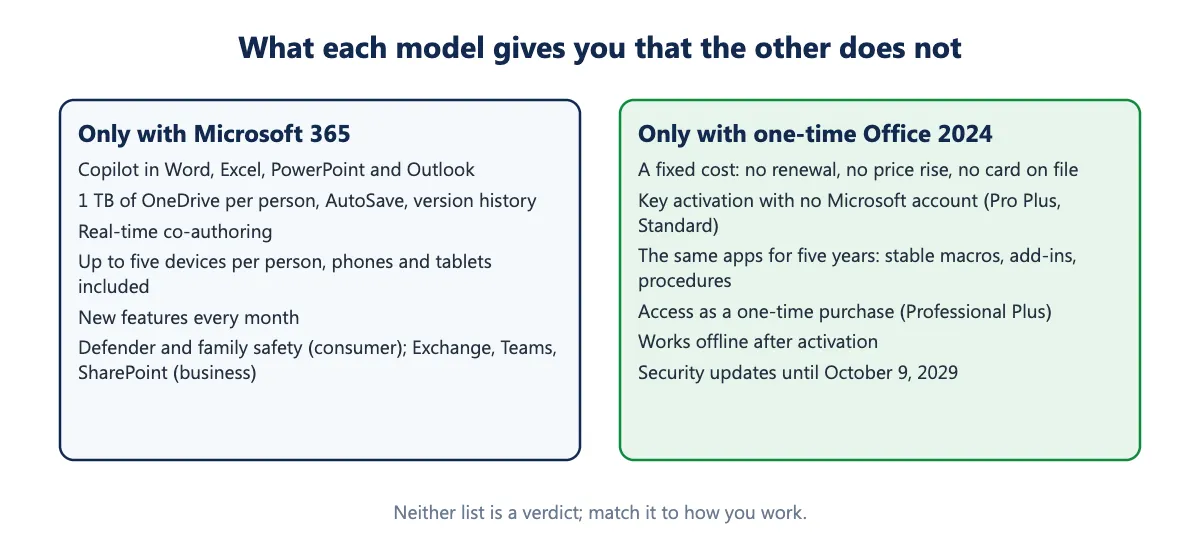
- Copilot in Word, Excel, PowerPoint and Outlook, with higher usage limits on the paid plans. Office 2024 has none and will not get it; Microsoft states the perpetual release receives no new features.
- 1 TB of OneDrive per person, and the AutoSave and version history that come with files stored there.
- Real-time co-authoring with other people in the same document.
- Five devices per person, including phones and tablets, and the ability to move between PCs by signing in.
- New features monthly, which matters if you work alongside Microsoft 365 users who send you files using functions your version lacks.
- Microsoft Defender and family-safety features on the consumer plans; Exchange, Teams and SharePoint on the business plans.
What only the one-time purchase gives you
- A fixed cost. No renewal, no price increase, no card on file. Microsoft raised the consumer subscription prices in 2025; a license bought in 2024 did not change.
- No account dependency for the volume editions. Professional Plus and Standard activate with a product key; nothing stops working if a Microsoft account is locked or a payment fails.
- Predictable software. The apps you learn in year one are the apps you have in year five. For a business with macros, add-ins and documented procedures, that stability is a feature.
- Access as a one-time purchase (Professional Plus), without paying a monthly business-plan rate for it.
- Works offline indefinitely after activation.
The cost of those benefits is that Office 2024’s support ends on October 9, 2029, and you will then choose whether to buy the next release. That is also true of every previous version: Office 2021 reached end of support on October 13, 2026, and our article on what Office 2021 end of support means describes what happens on that date (the apps keep working; the security fixes stop).
Which Office 2024 edition if you buy once
If you decide on the one-time purchase, the choice is Professional Plus (adds Access, Windows only), Standard (Outlook, no Access, Windows only), Home & Business (Outlook, Windows or Mac, retail) or Home (no Outlook, Windows or Mac, retail). No edition includes Publisher, which Microsoft retired in October 2026. The edition comparison has a decision table; how to buy Microsoft Office without a subscription covers where to buy and what to avoid; and what is new in Office 2024 lists the changes since 2021.
Three typical decisions
A freelancer with one laptop who writes, invoices and emails. Needs Word, Excel, Outlook; does not need Copilot or shared editing. One-time Office 2024 (Standard or Professional Plus) costs less than one year of Microsoft 365 Personal at Kymakers’ prices and is supported until October 2029. Buy once.
A family with two laptops, a desktop, and children doing schoolwork on tablets. Needs installs on many devices, storage for photos and homework, and probably Copilot for the students. Microsoft 365 Family does all of it for one price; four one-time licenses do not cover the tablets at all. Subscribe, or use the 5 PC pack for the Windows machines and the free web apps on the tablets if cloud storage is not a priority.
A ten-person company on Google Workspace for email. Needs the desktop apps, not Exchange or Teams. Two 5 PC packs cost less than a few months of Microsoft 365 Apps for business for ten users; the trade is no co-authoring and no Copilot. Buy once, and revisit in 2029.
Frequently asked questions
Is Office 2024 really a lifetime license? It is perpetual: you pay once and it keeps working. “Lifetime” refers to the life of that Office version on that computer. Microsoft’s security updates end on October 9, 2029; the apps still run after that.
What happens to my files if I cancel Microsoft 365? They remain yours. The apps drop to reduced-functionality mode (you can view and print but not edit), and OneDrive storage falls back to the free 5 GB, so files beyond that must be moved.
Can I have both? Yes, but not on the same PC with mixed architectures, and Microsoft recommends removing one before installing the other. Most people pick one.
Does the one-time purchase get updates? Security and stability updates until October 9, 2029, delivered through Office’s normal update mechanism. No new features.
Is Microsoft 365 cheaper for a family? Often, if the family uses the storage and the multi-device installs. Compare the Family subscription’s five-year total ($779.40 at the monthly rate) with the 5 PC pack’s price; if the extra services are not used, the pack is cheaper.
Which plan includes Access? Office 2024 Professional Plus (one-time) and the Microsoft 365 plans that install the desktop apps on Windows (Personal, Family, Apps for business, Business Standard). Access has no Mac version in either model.
Sources
- Microsoft, “Get started with Office 2024” (Office Home 2024, Office Home & Business 2024 and Microsoft 365 prices and contents): https://www.microsoft.com/en-us/microsoft-365/get-started-with-office-2024
- Microsoft Learn, “Overview of Office LTSC 2024” (features not included in the perpetual release): https://learn.microsoft.com/en-us/office/ltsc/2024/overview
- Microsoft Learn, “Office LTSC 2024 lifecycle”: https://learn.microsoft.com/en-us/lifecycle/products/office-ltsc-2024
- Microsoft Learn, “Office 2024 lifecycle”: https://learn.microsoft.com/en-us/lifecycle/products/office-2024
- Microsoft Learn, “Office LTSC 2021 lifecycle”: https://learn.microsoft.com/en-us/lifecycle/products/office-ltsc-2021
- Microsoft Support, “Microsoft Publisher will no longer be supported after October 2026”: https://support.microsoft.com/en-us/office/microsoft-publisher-will-no-longer-be-supported-after-october-2026-ee6302a2-4bc7-4841-babf-8e9be3acbfd7