Windows 11 activates in one of two ways: with a digital license that Microsoft has already recorded for this device, or with a 25-character product key that matches the installed edition. Most activation problems are not about the key at all; they are about which of those two situations you are in. So this guide starts with a five-question decision path, then gives the exact steps for each outcome: use the license you already have, enter the key you already own, fix an edition mismatch, recover after a hardware change, or buy a license because you genuinely need one. Error codes, commands and the “what if I never activate” question follow.
Key takeaways
- Check Settings › System › Activation before doing anything. If it already says “Windows is activated,” you need no key.
- A digital license is tied to the device and the edition; the same edition reinstalls and activates on the same hardware without a key.
- Keys are edition-specific. Pro keys do not activate Home, N editions need N keys, and Enterprise is not a consumer product.
- Link your Microsoft account to the license so the Activation troubleshooter can reactivate after a motherboard change. Linking does not change what the license permits.
- Phone activation still exists for Home and Pro (SLUI 04); it is not available for Pro Education or Pro for Workstations.
Contents
- The five-question decision path
- How Windows 11 activation works
- Outcome 1: you already have a license
- Outcome 2: you have a key, enter it
- Outcome 3: the key is for a different edition
- Outcome 4: the hardware changed
- Outcome 5: you need a new license
- Can a Windows 10 key activate Windows 11?
- Check activation status and license type
- Error codes
- Why 24H2 and 25H2 asked some PCs to reactivate
- What happens if you never activate
- Generic keys, KMS keys and activator tools
- Activating a new PC build
- Frequently asked questions
- Sources
The five-question decision path
Answer in order. Stop at the first “yes.”
| # | Question | Where to look | If yes |
|---|---|---|---|
| 1 | Does Settings › System › Activation already say “Windows is activated”? | Settings › System › Activation | Done. Optionally link your Microsoft account (Outcome 1). |
| 2 | Was this exact PC (same motherboard) activated with this edition of Windows 10 or 11 before, for example before a reinstall? | Your memory, or the previous owner | Run the Activation troubleshooter; the digital license should reattach (Outcome 1). |
| 3 | Do you have a product key for this edition (box, card, order email, or the firmware key of a PC that shipped with Windows)? | Settings › System › About shows the edition; the key-recovery guide shows how to read a firmware key | Enter it (Outcome 2). |
| 4 | Do you have a key, but for a different edition (Home key on Pro, Pro key on Home, Pro key on Pro N)? | Compare About with the key’s edition | Change the edition or get the matching key (Outcome 3). |
| 5 | Did you replace the motherboard or move the drive to a new PC? | — | Use the hardware-change troubleshooter with your linked Microsoft account (Outcome 4). |
| — | None of the above | — | You need a license (Outcome 5). |
How Windows 11 activation works
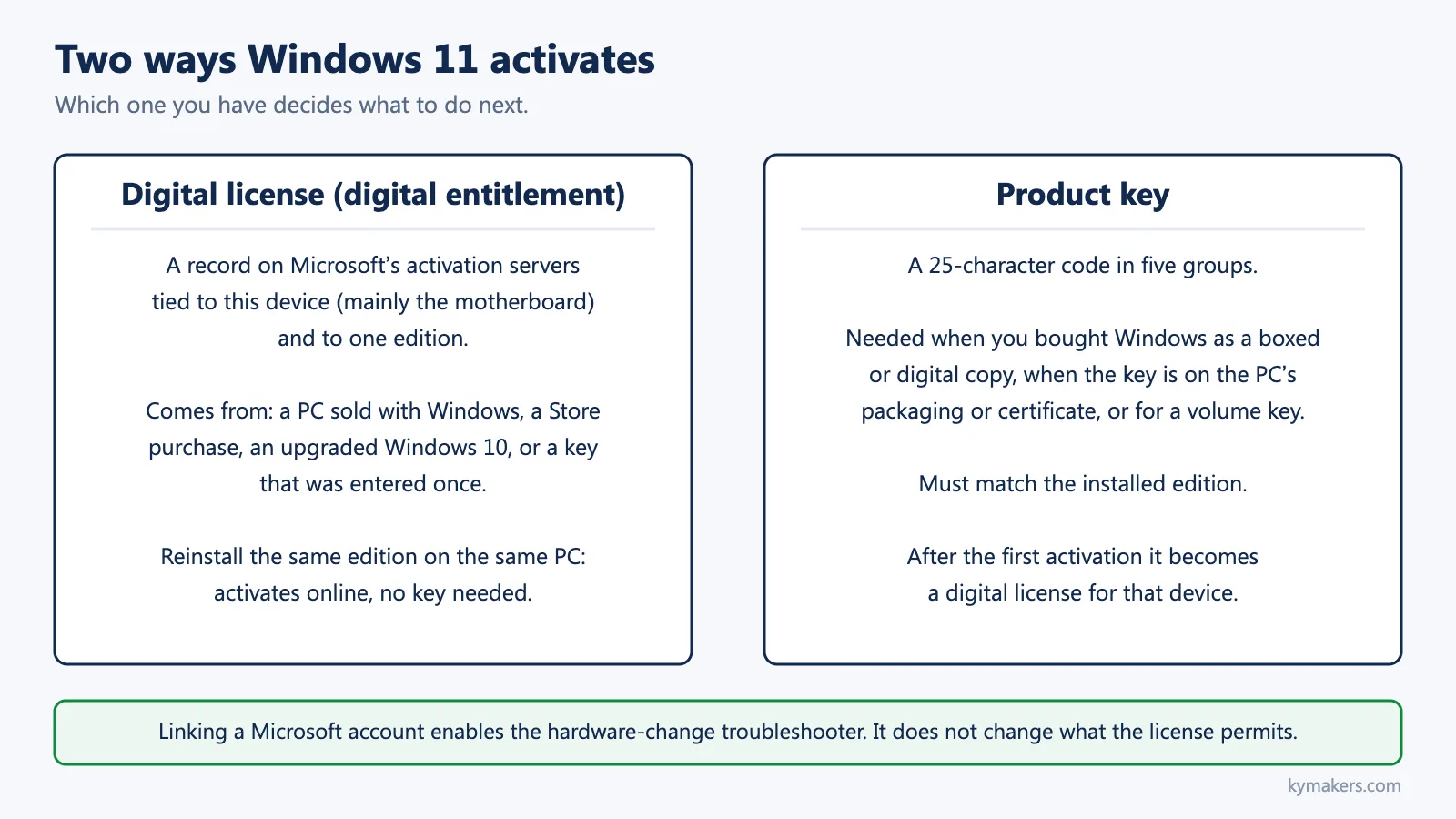
Digital license. Microsoft calls it a digital entitlement in Windows 11. It is a record on Microsoft’s activation servers that says this device, identified mainly by its motherboard, is licensed for a given edition. You get one when a PC ships with Windows, when you buy Windows from the Microsoft Store, when you upgrade a licensed Windows 10 to Windows 11, or when you enter a product key once; after that first activation the key becomes a digital license for that device. Microsoft’s statement is direct: you can reinstall the same edition of Windows 11 on this device without entering a product key, and it will activate online after installation.
Product key. A 25-character code in five groups. Microsoft says you need one when you buy Windows as a boxed copy or a digital copy from a retailer, when a PC came with Windows and the key is on its packaging or certificate of authenticity, or when your organization gives you a volume license key. You enter it at Settings › System › Activation › Change product key.
Edition matters for both. Microsoft: if your license does not match the Windows edition you bought or are entitled to, Windows will not activate.
The Microsoft account link. Linking your account to the digital license (Settings › System › Activation › Add an account) enables one specific thing: using the Activation troubleshooter after a significant hardware change. It is worth doing on every PC. It does not make an OEM license transferable, does not grant extra activations, and does not override the license terms.
Activation does not equal licensing. Activation is Microsoft’s servers accepting a key or recognizing a device. Whether you are entitled to use that copy on that machine is decided by the license type and its terms. OEM vs retail explains the difference.
Outcome 1: you already have a license
If Activation already reads “Windows is activated,” there is nothing to do except, if you have not, select Add an account and sign in with a Microsoft account so the status becomes “Windows is activated with a digital license linked to your Microsoft account.”
If Windows is not activated but this PC was activated before with the same edition, run Troubleshoot on the Activation page. The troubleshooter looks for a digital license for the device. If it finds one, you are done. If you upgraded editions since (Home to Pro, for example), the old Home license will not activate Pro; that is Outcome 3.
A PC that shipped with Windows carries its key in firmware. Windows Setup reads it and activates the edition it belongs to automatically. If you clean-installed and were never asked for a key, this is why.
Outcome 2: you have a key, enter it
- Settings › System › Activation.
- Next to Change product key, select Change.
- Enter the 25-character key and select Next. Approve the administrator prompt if asked.
- Within a minute the status should read “Windows is activated.”
Command-line equivalent, in Terminal (Admin):
slmgr /ipk XXXXX-XXXXX-XXXXX-XXXXX-XXXXX
slmgr /ato
Then link your Microsoft account (Add an account) so a future hardware change can be recovered.
Keys from a Windows 11 Pro purchase at Kymakers are entered the same way; the Windows 11 Pro install guide covers the clean-install path and this article covers activation itself.
Outcome 3: the key is for a different edition
| You have | Installed | What happens | Fix |
|---|---|---|---|
| Pro key | Home | Windows offers to upgrade the edition to Pro; on some PCs the direct upgrade fails with 0xC004F050 | Follow the Home-to-Pro guide, including the two-step route if the direct one fails |
| Home key | Pro | Rejected; Home keys cannot activate Pro | Install Home, or buy a Pro key or a Home-to-Pro upgrade |
| Pro key | Pro N (or Home N) | Rejected | N editions need N keys; see Windows 11 Pro N |
| Windows 10 Home key | Windows 11 Pro | Rejected | Same edition rule applies across versions |
| Consumer key | Enterprise, Education, Pro for Workstations | Rejected | These are separate products; see Enterprise vs Pro |
Not sure what is installed? Settings › System › About, or the what Windows do I have guide.
Outcome 4: the hardware changed
Microsoft treats a motherboard replacement as a significant hardware change; the digital license no longer matches the device. The documented recovery, which works only if you linked a Microsoft account before the change:
- Sign in as an administrator.
- Settings › System › Activation › Troubleshoot (shown only while Windows is not activated).
- Select I changed hardware on this device recently, then Next.
- Sign in with the linked Microsoft account.
- Select the device from the list, check “This is the device I’m using right now,” and select Activate.
Microsoft’s conditions: the edition must be the same before and after the change, and the troubleshooter works only with the linked account. If your device is not listed, make sure you are signed in with the account that was linked. If you have a retail product key, you can simply re-enter it after the change. If the PC came with Windows preinstalled and you replaced the motherboard, Microsoft’s activation-errors page says you may need to buy a new license; OEM licenses belong to the original device under their terms.
Drive swaps, RAM upgrades and graphics cards do not normally trigger this. For the long version, including what to do when the troubleshooter cannot find the device, see reactivating after a hardware change.
Outcome 5: you need a new license
You are here if the PC has never been activated with this edition, you have no key for it, and no hardware-change recovery applies. Your options are the Microsoft Store (Settings › System › Activation › Open Store), a retail key from a retailer, or a key from a reseller. Before buying from anyone, read is it safe to buy cheap Microsoft license keys and choose the edition you actually need: Home vs Pro and the pricing guide cover that decision. Kymakers sells Windows 11 Pro, Windows 11 Home and the Home to Pro upgrade, each as a one-time purchase for one PC.
Can a Windows 10 key activate Windows 11?
Yes, for the matching edition: a Windows 10 Pro key activates Windows 11 Pro, and a Windows 10 Home key activates Windows 11 Home. A Windows 10 PC that was activated also carries its digital license into an in-place upgrade to Windows 11. Windows 7 and 8.1 keys are no longer accepted for new Windows 10 or 11 activations.
Check activation status and license type
Settings › System › Activation shows one of four states: “Windows is activated,” “Windows is activated with a digital license,” “Windows is activated with a digital license linked to your Microsoft account,” or “Windows is not activated.”
In Terminal (Admin):
slmgr /xpr
slmgr /dli
slmgr /dlv
/xpr reports whether the machine is permanently activated. /dli shows the partial product key and the channel (Retail, OEM, Volume), which tells you what kind of license you hold. /dlv adds the full licensing detail, including remaining KMS time on volume installs.
Error codes
| Code | Microsoft’s meaning | Where to go |
|---|---|---|
| 0xC004F050 | Key invalid for this edition or not accepted | Outcome 3 |
| 0xC004F210 | Key for a different edition than the one installed | Outcome 3 |
| 0xC004F034 | Invalid key, or key for a different Windows version | Outcome 2, re-check the key |
| 0xC004C003 | Server blocked the key; keys are unique to one device | Contact the seller; key not working guide |
| 0xC004C008 | Key already used on another device | Same |
| 0xC004F213 | No product key found on the device | Enter the key; after a motherboard change on a preinstalled PC, see Outcome 4 |
| 0x803F7001 | No valid Windows 11 license found for this device | Outcome 1 (troubleshooter) or Outcome 2 |
| 0x803FA067 | License not valid for this hardware | Outcome 4 |
| 0xC004F074 | KMS host not reachable (volume activation) | Error 0xC004F074 |
| 0x8007232B / 0x8007007B | DNS name does not exist, typically a KMS client key on a home PC | Enter a retail or OEM key |
| 0xC004FC03 | Could not reach the activation service | Check network, time and proxy; phone activation as a fallback |
Microsoft’s full list is on its “Get help with Windows activation errors” page (sources).
Why 24H2 and 25H2 asked some PCs to reactivate
A feature update can trigger a fresh check against the activation servers. A PC with a healthy digital license reactivates silently. PCs that had been activated with keys that Microsoft later blocked, or whose hardware had changed since the last activation, showed “not activated” after the update. The fix is the decision path above, not a reinstall. Installation failures on 25H2 are a separate topic: see Windows 11 25H2 install errors.
What happens if you never activate
Windows keeps working. You see an “Activate Windows” watermark, personalization settings (wallpaper, colors, themes) are locked, and the Activation page nags. Microsoft does not shut the system down or stop security updates. It is still unlicensed use. Our activate Windows watermark article covers the watermark itself.
Generic keys, KMS keys and activator tools
Two kinds of keys look like product keys but never activate a home PC. Generic installation keys are the keys Windows Setup uses to install a specific edition without a license; Microsoft’s documentation states that an installation key “is only used to install Windows” and “is not used to activate Windows.” KMS client setup keys (GVLKs) are published by Microsoft for computers that activate against an organization’s own KMS host; Microsoft’s note is that they “won’t activate or serve as a retail license key.” If a key finder shows you one of these, it is not your license. The generic key vs activation key explainer covers how to tell the three kinds apart.
Activators and KMS emulators do not create a license. They require administrator rights, usually ask you to disable Microsoft Defender, are a common malware vector, and leave the PC exposed to being deactivated at the next check. Do not use them.
Activating a new PC build
- Choose the edition before you buy anything: Home vs Pro. Home-to-Pro is an in-place change later, but buying the right edition first is simpler.
- Create installation media: create a bootable Windows 11 USB. Check Windows 11 requirements (TPM 2.0, Secure Boot) first.
- During Setup, enter your key when asked, or choose “I don’t have a product key” and pick the edition manually; you can enter the key afterwards.
- After first sign-in, Settings › System › Activation › Change product key if needed, then Add an account to link your Microsoft account.
- Confirm “Windows is activated.”
Frequently asked questions
Is Windows 11 activation free? Activation itself costs nothing; the license does. A PC that shipped with Windows or an upgraded Windows 10 PC already has one.
Can I use a Windows 10 key for Windows 11? Yes, for the same edition.
How long can I use Windows 11 without activating? Indefinitely, with a watermark and locked personalization. It remains unlicensed.
Why did Windows deactivate after an update? A feature update re-checks the license. See the 24H2/25H2 section.
Do I need a Microsoft account to activate? No. Linking one is recommended for hardware-change recovery.
What is error 0xC004F050? The key was not accepted for the installed edition; usually an edition mismatch or a blocked Home-to-Pro upgrade.
Can I move my Windows 11 license to a new PC? It depends on the license type, not on your account. Retail licenses can generally be moved after removing them from the old PC; OEM licenses stay with the original device. See transferring a Windows license.
Does phone activation still exist? Yes, for Home and Pro, through SLUI 04. It is not available for Pro Education or Pro for Workstations.
Sources
- Microsoft Support, “Activate Windows”: support.microsoft.com/help/12440
- Microsoft Support, “Find your Windows product key”: support.microsoft.com/help/10749
- Microsoft Support, “Reactivating Windows after a hardware change”: support.microsoft.com
- Microsoft Support, “Upgrade Windows Home to Windows Pro”: support.microsoft.com
- Microsoft Support, “Get help with Windows activation errors”: support.microsoft.com
- Microsoft Learn, “KMS client activation keys”: learn.microsoft.com
- Microsoft Learn, “Windows Setup Edition Configuration and Product ID Files (EI.cfg and PID.txt)”: learn.microsoft.com