Visual Studio 2026 vs 2022 comes down to four things: a faster IDE, built-in AI, a new Fluent interface, and a new update model. Visual Studio 2026 (version 18) became generally available on November 11, 2025. It installs side by side with Visual Studio 2022, opens the same solutions, and runs most 2022 extensions. If your PC meets the requirements and you work in .NET 10, C# 14 or modern C++, the upgrade is worth it; if you depend on an extension that has not been updated, keep 2022 installed next to it. This guide compares both versions point by point so you can decide, then shows how to upgrade.
Visual Studio 2026 vs 2022 at a glance
Visual Studio 2026 is the first major version since 2022 and the first to ship with GitHub Copilot built into the IDE rather than added as an extension. The table below summarises the differences that matter day to day.
| Feature | Visual Studio 2022 (v17) | Visual Studio 2026 (v18) |
|---|---|---|
| Release | November 8, 2021 | November 11, 2025 (current build 18.11.2, October 25, 2026) |
| Interface | Classic VS theme, Visual Studio icons | Fluent UI: new icons, themes, editable colour tokens, unified Settings backed by settings.json |
| AI | GitHub Copilot as an optional extension | Copilot integrated across the IDE: agent mode, Adaptive Paste, Profiler agent, Unit Test Debugger agent, bring-your-own-key for OpenAI, Anthropic, Microsoft Foundry and Ollama |
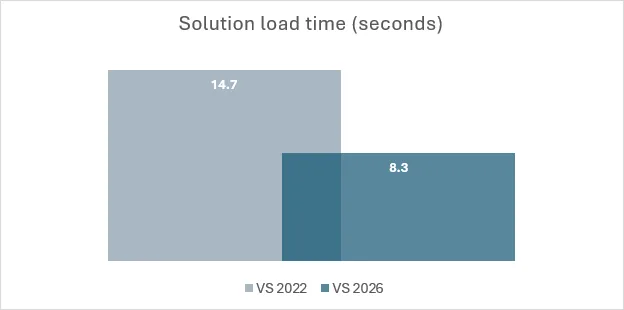
| Performance | Baseline | Microsoft reports about 50% fewer UI hangs and roughly 40% faster loading of large solutions; opt-in “stop build after first failure” |
| .NET and C# | .NET 8 LTS, C# 12 (C# 13 with 17.12+) | .NET 10 LTS and C# 14 out of the box |
| C++ toolset | MSVC 14.3x–14.4x | MSVC 14.50, C++23 IntelliSense feature-complete (except modules) since 18.11.1 |
| Update channel | Release + Preview | Release + Insiders (monthly early builds, side-by-side) |
| Side-by-side install | Runs next to 2019 | Runs next to 2022; Setup Assistant imports settings, shortcuts and extensions |
| Windows support | Windows 10 1909+, Windows 11, Server 2016+ | Windows 10, Windows 11 (including ARM64), Server 2019/2022/2025; no 32-bit, no LTSC, no S mode |
| Editions | Community, Professional, Enterprise | Community, Professional, Enterprise (same split) |
Need the IDE today? Kymakers sells one-time product keys for Visual Studio Professional 2026 ($17.49) and Visual Studio Enterprise 2026 ($19.49), delivered by email with Microsoft’s official download link and activation steps, backed by a 180-day money-back guarantee.
What’s new in Visual Studio 2026?
Visual Studio 2026 adds four headline changes over 2022: an AI layer built into the editor, debugger and profiler; a redesigned Fluent interface; measurable speed gains on large solutions; and first-class support for .NET 10, C# 14 and the MSVC 14.50 C++ toolset. Everything else, from project types to the solution format, carries over unchanged, which is why the upgrade feels familiar after the first hour.
AI inside the IDE, not bolted on
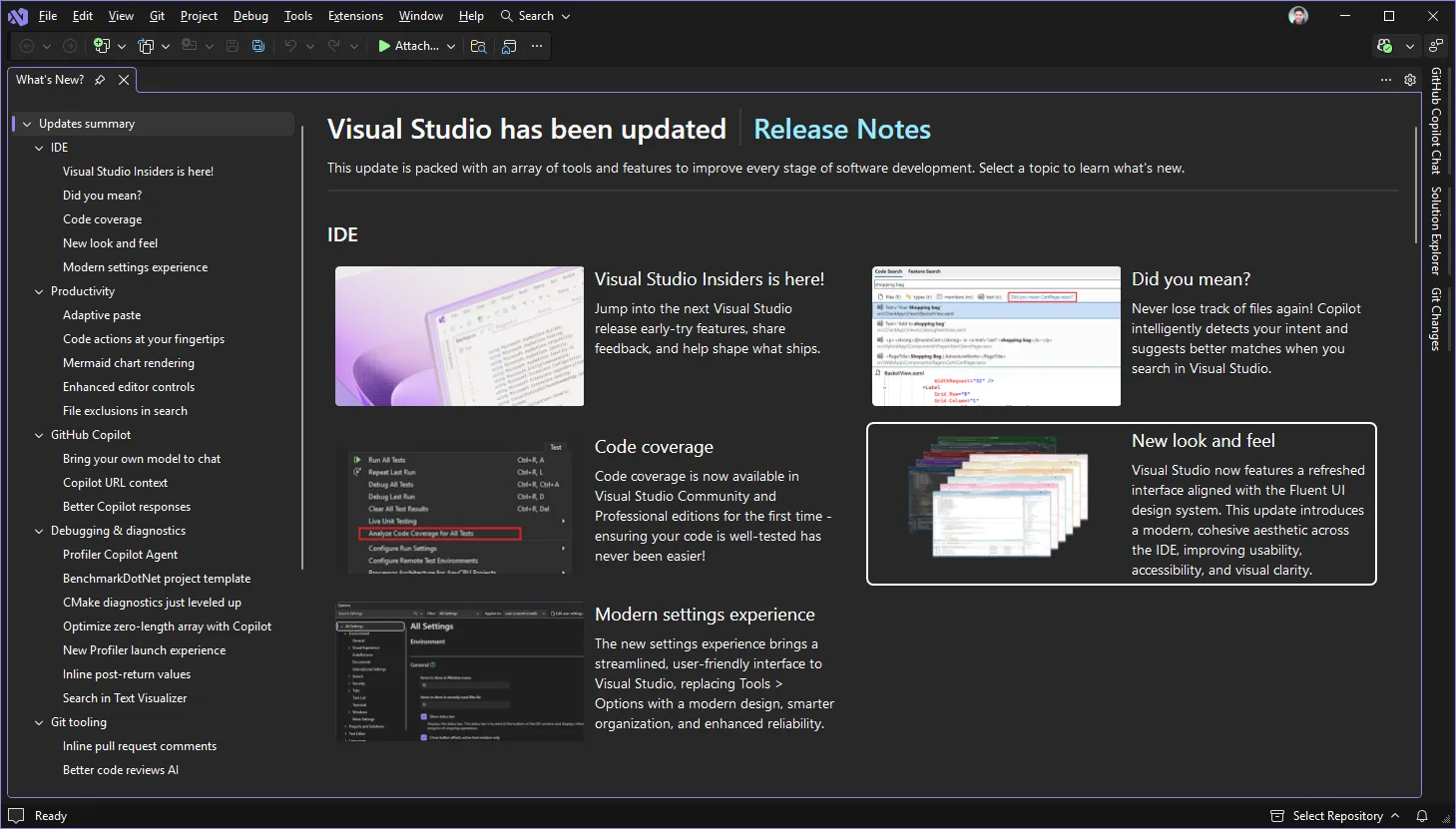
In 2022, Copilot was an extension you installed and signed into separately. In 2026 it ships with the IDE. The practical additions are Adaptive Paste, which rewrites pasted code to match the surrounding style and variable names; a Profiler Copilot agent that reads a trace and points at hotspots; a Unit Test Debugger agent that explains failing tests; and an agent mode (preview since 18.8) that can plan and apply multi-file changes. Since version 18.10, bring-your-own-key lets you point Copilot chat at your own OpenAI, Anthropic, Microsoft Foundry or local Ollama models, and 18.11 introduced a new chat experience built on the Copilot SDK. You still need a Copilot plan for the hosted models; the free tier covers light use.
Fluent UI and a cleaner settings experience
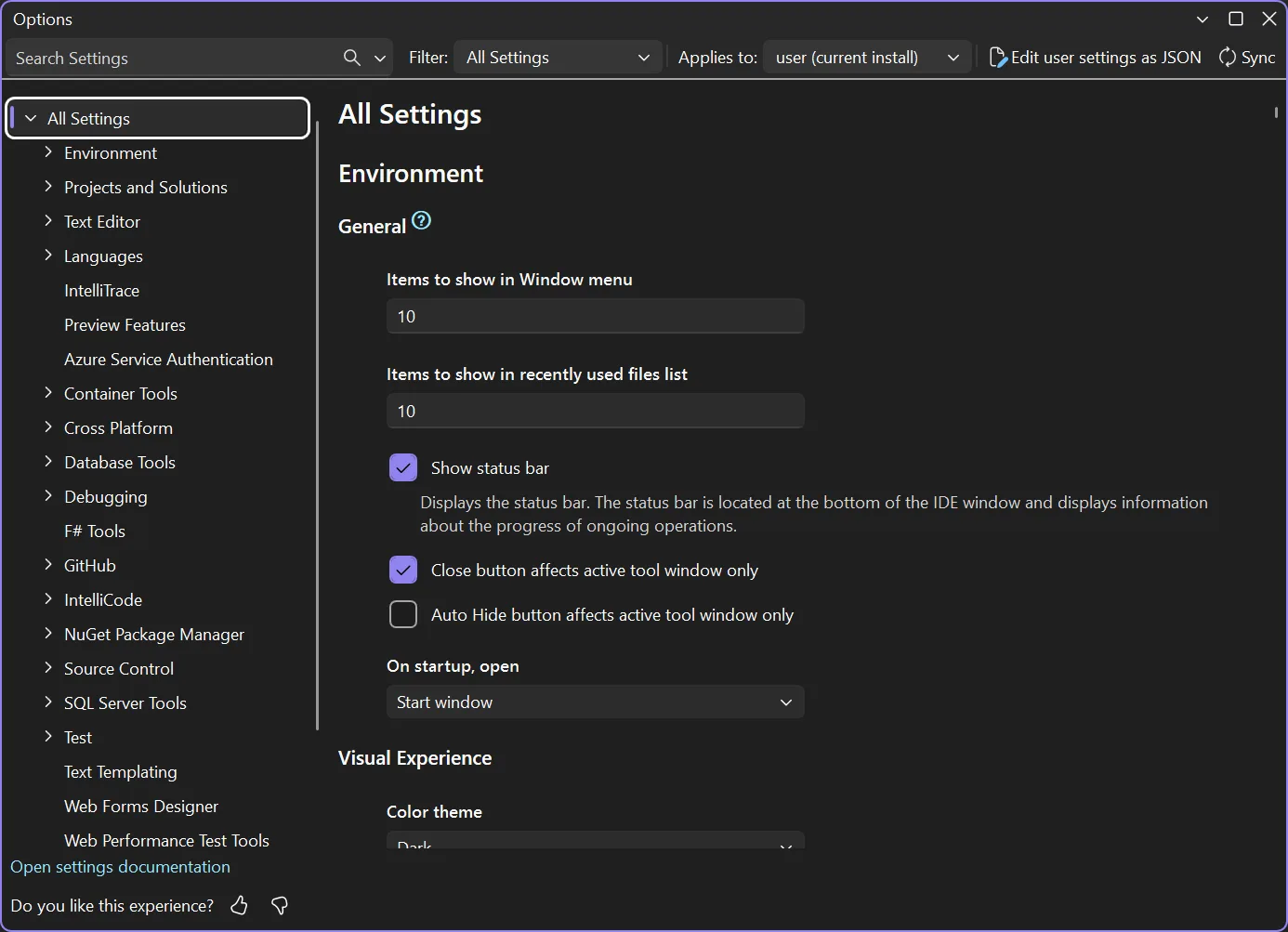
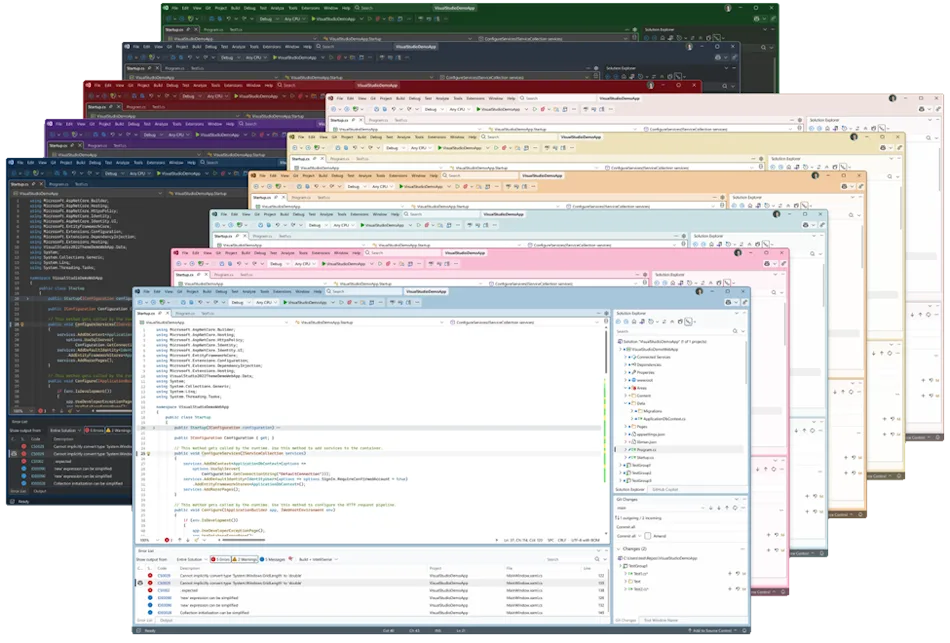
The 2026 interface follows Microsoft’s Fluent design: new icons, more spacing, full-colour emoji in the editor, and themes whose colour tokens you can edit directly. Fonts and Colors moved into the Unified Settings page in 18.11 and are stored in a settings.json file, which makes it easy to version your IDE setup or copy it between machines. If you prefer the old look, the classic icon set is still available as an option.
Platform support: .NET 10, C# 14, MSVC 14.50
Visual Studio 2026 is the version Microsoft built for .NET 10, a long-term-support release, and for C# 14. Visual Studio 2022 can target .NET 10 with workarounds, but the designers, analyzers and project templates are only fully aligned in 2026. For C++ developers, 18.0 shipped MSVC Build Tools 14.50 with further C++23 conformance, and by 18.11.1 IntelliSense is feature-complete for C++23 apart from modules. Microsoft measured the new compiler on Unreal Engine’s City Sample at up to 6% faster on the render thread versus VS 2022 17.14, with binary compatibility with 2022 builds preserved.
Is Visual Studio 2026 faster than 2022?
Yes, measurably, on large solutions. Microsoft’s figures for the 18.0 release are about 50% fewer UI hangs and roughly 40% faster load times for large solutions, and startup is quicker because more of the IDE now runs on modern .NET rather than .NET Framework. Version 18.11 added an opt-in “stop solution build after first failure” option; in Microsoft’s testing it cut the time spent finishing a failed build on large solutions from 26 seconds to 1.5 seconds on average, a 94% reduction. On a small single-project solution the two versions feel similar; the gap opens on solutions with dozens of projects.
Two caveats from early adopters: parts of the IDE still depend on .NET Framework, so memory use has not dropped as much as speed has, and the AI features add background work. On a machine with 8 GB of RAM you will notice the difference; Microsoft recommends 16 GB for professional workloads and the new Fluent UI runs best on an SSD.
Can Visual Studio 2026 and 2022 run side by side?
Yes. Visual Studio 2026 installs alongside Visual Studio 2022 without replacing it, the same way 2022 sat next to 2019. The installer is shared, each version keeps its own instance and settings, and you can open the same solution in either one because the .sln format did not change. On first launch, the 2026 Setup Assistant offers to import your 2022 themes, keyboard shortcuts, preferences and installed extensions, so you do not start from a blank IDE. Keep 2022 installed until every extension and build pipeline you rely on has been verified in 2026, then remove it from the Visual Studio Installer.
Will my Visual Studio 2022 projects and extensions work in 2026?
Projects and solutions, yes. Extensions, mostly. Visual Studio 2026 opens 2022 solutions without conversion, and Microsoft states that the C++ build tools and runtime keep binary compatibility with 2022, so libraries compiled with 14.3x or 14.4x link against 14.50 output. For extensions, Microsoft reports more than 4,000 Marketplace extensions already working in 2026, and 2022 extensions load unless they depend on an API that moved. The ones most likely to need an update are older UI-heavy extensions that assumed the classic theme. Check the Marketplace listing for a “Visual Studio 2026” compatibility tag before you upgrade a machine that depends on a specific tool.
If you build databases with your apps, the same side-by-side logic applies on the server: SQL Server 2022 Standard works with both Visual Studio versions, and our SQL Server 2022 licensing guide explains the per-core and server/CAL options for development and production boxes.
Visual Studio 2026 system requirements compared with 2022
Visual Studio 2026 needs a 64-bit Windows 10 or Windows 11 PC (x64 or ARM64) with at least 4 GB of RAM, and Microsoft recommends 16 GB for typical professional work and 64 GB for the best experience. Disk space ranges from 2.5 GB to 210 GB depending on workloads, with a typical install using 20–50 GB; an SSD is recommended. The minimum display is 1366 × 768 and 1920 × 1080 or higher is recommended. Windows Server 2019, 2022 and 2025 Standard and Datacenter are supported for build servers.
Two changes from 2022 catch people out. First, 32-bit and ARM32 systems are no longer supported, so a 2026 install on an old 32-bit Windows 10 machine fails at setup. Second, Windows LTSC editions, S mode and IoT editions are not supported; if your workstation runs Windows 11 Enterprise LTSC, you need a standard edition such as Windows 11 Pro for the development PC. Windows 10 is still listed as supported, but Microsoft ended Windows 10 support on October 14, 2025, so a new development machine should be on Windows 11. For a heavy C++ or game workload with 64 GB of RAM and multiple CPUs, Windows 11 Pro for Workstations is the edition built for that hardware.
Visual Studio 2026 editions and price
Visual Studio 2026 keeps the three-edition split from 2022. Community is free for individual developers, open-source projects, classroom use and small non-enterprise teams of up to five users. Professional adds the commercial-use licence and CodeLens for teams. Enterprise adds IntelliTrace, Live Unit Testing, Code Map, Microsoft Fakes and the architecture tools. Microsoft lists Professional 2026 as a standalone licence at $499.99 or as a monthly cloud subscription, while Enterprise is sold by Microsoft as a subscription. Our separate guide to Visual Studio 2026 Community vs Professional vs Enterprise goes feature by feature; the short version is that most solo developers and small studios need Professional, and only teams using IntelliTrace or Live Unit Testing need Enterprise.
At Kymakers, a Microsoft partner (Makers Unity LLC), a Visual Studio Professional 2026 product key is $17.49 and a Visual Studio Enterprise 2026 product key is $19.49. Both are one-time purchases for one developer with commercial use allowed, delivered by email within minutes with Microsoft’s official installer link; the Enterprise key covers the IDE and its tools without the Visual Studio subscription benefits such as Azure credits.
Should you upgrade from Visual Studio 2022 to 2026?
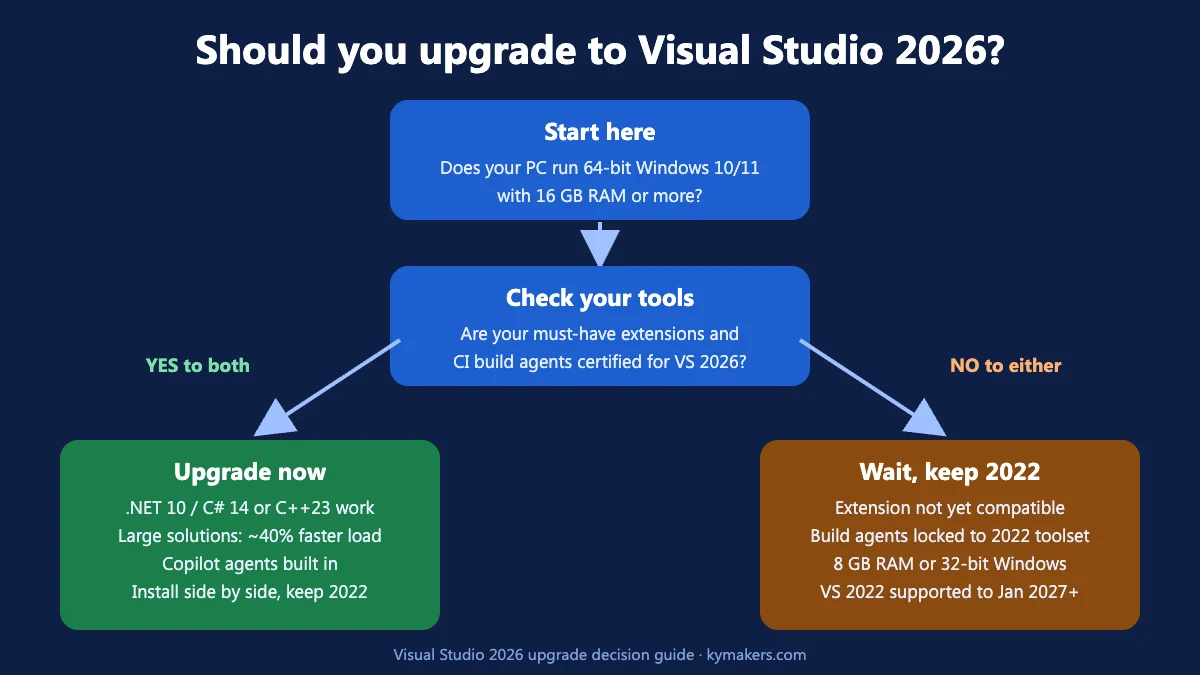
Upgrade now if any of these apply: you are starting .NET 10 or C# 14 work; you build large solutions where the 40% load-time gain is measured in minutes a day; you want Copilot agent features without extension juggling; or you write C++ and want MSVC 14.50 and the C++23 IntelliSense. The side-by-side install means the risk is low, because 2022 stays available as a fallback.
Stay on 2022 for now if your team depends on an extension or an internal tool that has not been certified for 2026, if your build agents are locked to the 2022 toolset by policy, or if your machines have 8 GB of RAM or 32-bit Windows. Visual Studio 2022 remains in Microsoft’s mainstream support until January 2027 with extended support for years after that, so there is no security reason to rush. A sensible plan for a team is to put 2026 on one developer’s machine for a sprint, confirm the extension list and CI pipeline, then roll it out.
How to upgrade from Visual Studio 2022 to 2026
- Run the Visual Studio Installer you already have, or download the 2026 installer from Microsoft. Visual Studio 2026 appears as a separate product; choose Install, not Modify on 2022.
- Pick the same workloads you use in 2022 (for example .NET desktop, ASP.NET and web, Desktop development with C++, Game development). Workload names are unchanged.
- On first launch, sign in and let the Setup Assistant import settings, shortcuts and extensions from 2022.
- Enter your product key under Help > Register Visual Studio (Professional and Enterprise). A key bought from Kymakers arrives by email with the exact steps.
- Open your main solution, build, and run the test suite. Check Extensions > Manage Extensions for anything marked incompatible.
- Update CI build agents to the 2026 Build Tools, or keep them on 2022 until the toolset change is approved.
- Once everything passes, remove Visual Studio 2022 from the installer to reclaim 20–50 GB of disk.
Setting up a fresh build server at the same time? Visual Studio 2026 Build Tools are supported on Windows Server 2025 Standard, and the Windows Server 2025 licensing guide covers cores and CALs. Browse the full Windows, Windows Server and Office apps ranges for the rest of a developer workstation.
Visual Studio 2026 vs 2022: FAQ
When was Visual Studio 2026 released?
Visual Studio 2026 (version 18.0) became generally available on November 11, 2025, alongside .NET 10. Microsoft ships a feature update roughly every month; the current release is 18.11.2 from October 25, 2026.
Can I install Visual Studio 2026 next to Visual Studio 2022?
Yes. Visual Studio 2026 installs side by side with 2022 using the same Visual Studio Installer, keeps separate settings, and opens the same solutions. The Setup Assistant can import your 2022 settings and extensions on first launch.
Is Visual Studio 2026 free?
Visual Studio Community 2026 is free for individuals, open-source projects, education and small non-enterprise teams of up to five users. Commercial teams need Professional or Enterprise, which Microsoft sells as a standalone licence (Professional, $499.99) or subscription; Kymakers sells one-time Professional 2026 keys for $17.49 and Enterprise 2026 keys for $19.49.
Does Visual Studio 2026 support Windows 10?
Yes, 64-bit Windows 10 Home, Pro, Education and Enterprise are supported, but 32-bit systems, LTSC editions, S mode and IoT editions are not. Because Microsoft ended Windows 10 support on October 14, 2025, Windows 11 is the recommended platform for a new development PC.
Does Visual Studio 2026 include GitHub Copilot?
Copilot is built into Visual Studio 2026 rather than installed as an extension, including agent mode, Adaptive Paste and the profiler and test-debugger agents. Using the hosted models still requires a GitHub Copilot plan; from version 18.10 you can also bring your own OpenAI, Anthropic, Microsoft Foundry or Ollama key.
Is Visual Studio 2022 still supported?
Yes. Visual Studio 2022 stays in mainstream support until January 2027 and in extended support for several years afterwards, so you can keep it installed next to 2026 while you migrate.
Get Visual Studio 2026 today
Visual Studio 2026 is a faster, AI-assisted successor that respects everything you built in 2022, and the side-by-side install removes most of the upgrade risk. When you are ready, Kymakers delivers a genuine Visual Studio Professional 2026 key for $17.49 or a Visual Studio Enterprise 2026 key for $19.49 by email within minutes, with Microsoft’s official download link, step-by-step activation instructions, 24/7 support and a 180-day money-back guarantee. Sold by Kymakers, a Microsoft partner (Makers Unity LLC).
Product screenshots and the performance chart are Microsoft’s, reproduced unaltered under Microsoft’s Use of Microsoft Copyrighted Content guidelines. Visual Studio is a trademark of Microsoft Corporation.