A generic Windows 11 Pro key installs or switches to the Pro edition; an activation key licenses it. They look identical, 25 characters in five groups, which is why “generic product key for Windows 11 Pro” is searched hundreds of times a month by people wondering whether the key they found, or were given, will actually activate their PC. It will not, and it was never meant to. This article explains what the generic key is, why Windows Setup uses it, how it differs from a KMS client key and from your real product key, how the two-code Home-to-Pro upgrade uses one of each, and what to do if the “key” you have turns out to be generic.
Key takeaways
- Microsoft’s own documentation: a key used in installation media “is only used to install Windows” and “is not used to activate Windows.”
- The widely published Windows 11 Pro generic key (it ends in 3V66T) selects the Pro edition during Setup or an edition change. It carries no license.
- KMS client setup keys (the Pro one ends in T83GX) are a second kind of non-activating key, meant for PCs that activate against a company’s own KMS host. Microsoft states they “won’t activate or serve as a retail license key.”
- Your activation key is the retail or OEM key you bought or that came with the PC, or the digital license Microsoft recorded for the device after it was first activated.
- If a key finder shows a key ending in 3V66T or T83GX, that is not your license; your real one is a digital license or elsewhere.
Contents
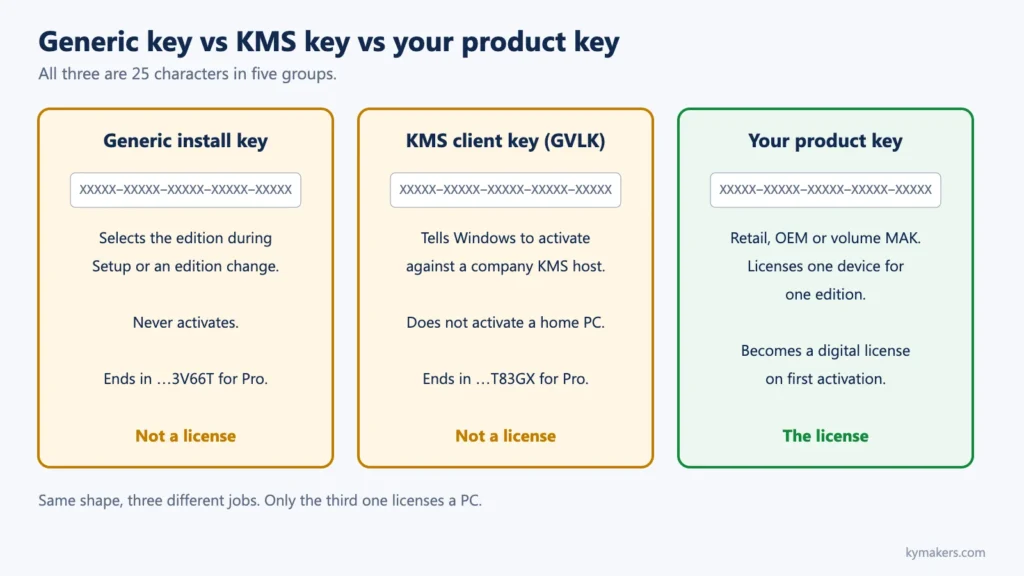
- Three kinds of 25-character keys
- What the generic Pro key does
- What a KMS client key does
- What your activation key does
- How the two-code Home-to-Pro upgrade uses both
- How to tell which kind you have
- What to do if your key is generic
- Frequently asked questions
- Sources
Three kinds of 25-character keys
| Kind | Purpose | Activates a home PC? | Where it comes from |
|---|---|---|---|
| Generic installation key (also called default or edition key) | Tells Setup or the edition-change dialog which edition to install | No, never | Built into Windows Setup; published in forums and deployment documentation |
| KMS client setup key (GVLK) | Marks a PC as a client of an organization’s Key Management Service host | No, unless a KMS host on the local network activates it | Microsoft publishes the full list for IT administrators |
| Product key (retail, OEM or volume MAK) | Licenses one device for one edition; becomes a digital license on first activation | Yes | Retail box or card, order email, OEM firmware or certificate of authenticity, volume agreement |
The first two exist so that Windows can be installed and configured before a license is applied. Only the third is a license.
What the generic Pro key does
When Windows Setup needs to install a specific edition and no license is available yet, it uses a built-in installation key for that edition. For Windows 11 Pro, that key is the one you see quoted everywhere, ending in 3V66T. Entering it does exactly one thing: it sets the edition to Pro. Microsoft’s deployment documentation describes installation keys plainly: the product key in the product ID file “is only used to install Windows” and “is not used to activate Windows.”
Three situations where you meet it:
- A clean install with “I don’t have a product key.” Setup installs the edition you pick using its built-in key, then looks for a digital license online after first boot. If the PC has one for that edition, Windows activates; if not, it stays unactivated.
- A Home-to-Pro edition change. Entering the generic Pro key under Settings › System › Activation › Change product key switches Home to Pro. Windows restarts as Pro and reports “Windows is not activated” until a Pro license is applied.
- A key finder on an unlicensed or digitally licensed PC. Key finders decode the key stored in the registry. On a PC that was installed with the generic key, that is what they show. People then try to “activate” with it and get 0xC004F050 or 0x803F7001.
The generic key is not a hack and is not illegal to type; Microsoft’s own Setup uses it. It simply is not a license, so the Activation page will keep asking for one.
What a KMS client key does
Organizations with volume licenses can run a Key Management Service host on their own network. PCs that should activate against it carry a KMS client setup key, formally a Generic Volume License Key. Microsoft publishes these keys publicly; the Windows 11 Pro one ends in T83GX, the Pro N one in GCQG9, the Pro for Workstations one in 6Q84J. Microsoft’s caution on that page is the whole story for a home user: KMS client keys “won’t activate or serve as a retail license key,” and to use them you need a KMS host on your local network.
If you enter a KMS client key on a home PC you get error 0xC004F074 (“the Key Management Service is unavailable”) or 0x8007232B (“DNS name does not exist”), because Windows is looking for a KMS host that does not exist. The fix is to enter a real retail or OEM key; see error 0xC004F074.
“KMS activators” that pretend to be a KMS host on your own PC are something else entirely: unauthorized tools that do not create a license, require disabling Microsoft Defender to run, and are a common malware vector. Do not use them.
What your activation key does
A product key is the 25-character code Microsoft says you need when you bought Windows as a boxed or digital copy, when your PC came with Windows and the key is on its packaging or certificate, or when your organization gave you a volume key. When you enter it and Windows activates, Microsoft’s servers record a digital license (a digital entitlement, in Windows 11 terms) for the device and edition. From then on, Microsoft says, you can reinstall the same edition on this device without entering a product key.
Two consequences follow. Your real license may not be a key at all any more: a PC upgraded from Windows 10, a Microsoft Store purchase, or a key entered years ago all leave a digital license and no retrievable key. And the key is edition-specific: Microsoft’s rule is that if the license does not match the installed edition, Windows will not activate.
The license type (retail, OEM or volume) decides what you may do with it, such as moving it to another PC; OEM vs retail covers that. Activation confirms the key; it does not expand the license.
How the two-code Home-to-Pro upgrade uses both
Microsoft’s documented way to upgrade an activated Windows 11 Home PC to Pro is to enter a Windows 11 Pro product key at Settings › System › Activation › Change product key. On some PCs, often ones with an OEM Home license in firmware, that direct route is widely reported to fail with 0xC004F050 even though the key is valid. The workaround, which Kymakers builds into its Home to Pro upgrade key, separates the two jobs:
- Enter the generic Pro key (code 1). Windows switches the edition to Pro and restarts. It is now Pro, and unactivated. That is expected.
- Enter your own Windows 11 Pro product key (code 2). Windows activates.
Each code does one of the two jobs described in this article, which is why the order cannot be swapped and why code 1 alone leaves a watermark. The full procedure, with Microsoft’s labels and the error table, is in the Home-to-Pro upgrade guide.
How to tell which kind you have
- Look at the status first. Settings › System › Activation. If it says “Windows is activated,” you have a license, whatever a key finder shows. Microsoft’s four states are: Windows is activated; Windows is activated with a digital license; Windows is activated with a digital license linked to your Microsoft account; Windows is not activated.
- Read the channel. In Terminal (Admin):
slmgr /dli. The description line names the channel: RETAIL, OEM_DM (firmware), OEM_COA, VOLUME_KMSCLIENT or VOLUME_MAK. A KMS client key shows VOLUME_KMSCLIENT; the generic retail install key shows RETAIL with a “notification” license status because it is unlicensed. - Compare the last five characters.
slmgr /dlialso prints the last five characters of the installed key. 3V66T is the generic Pro install key; T83GX is the Pro KMS client key. Neither is your license. - Read the firmware key, if any.
(Get-CimInstance -ClassName SoftwareLicensingService).OA3xOriginalProductKeyin PowerShell prints the OEM key a manufacturer embedded, or nothing. The key-recovery guide explains every source of a real key.
What to do if your key is generic
- The PC was activated before (same motherboard, same edition): run Settings › System › Activation › Troubleshoot. The digital license should reattach. Then Add an account to link your Microsoft account.
- You upgraded Home to Pro with the generic key and have a Pro key: enter the Pro key now.
- You have a Home license and want Pro: buy a Pro license. The Home to Pro upgrade key is the in-place route; a full Windows 11 Pro key suits a clean install or a new PC. The pricing guide compares them with Microsoft’s Store price.
- You have no license for this edition and were never activated: you need one. Home vs Pro helps you pick; is it safe to buy cheap keys tells you what to check about any seller.
- A key you bought is rejected: the Windows product key not working guide diagnoses edition, entitlement, error code and hardware change in order.
Frequently asked questions
Is the Windows 11 Pro generic key legal to use? Yes. It is the key Windows Setup itself uses to install Pro. Using it does not license Windows; it leaves the PC unactivated until a license is applied.
Why does my key finder show a key ending in 3V66T? Because the installed key is the generic install key. Your real license is a digital license on Microsoft’s servers (check the Activation page), a retail key in your email, or an OEM key in firmware.
Can the generic key become activated later? No. Activation replaces it with your product key or attaches a digital license. The generic key itself never activates.
What is the difference between a generic key and a KMS key? A generic key selects an edition during install; a KMS client key tells Windows to activate against a company KMS host. Neither licenses a home PC.
Does a Windows 11 Pro key work on Windows 11 Pro N? No. N editions have their own keys, generic and retail alike. See Windows 11 Pro N.
I entered the generic key on Home and now Pro shows a watermark. Did I break something? No. You completed the edition change. Enter a Windows 11 Pro product key to activate, or reinstall Home if you did not intend to upgrade.
Sources
- Microsoft Learn, “Windows Setup Edition Configuration and Product ID Files (EI.cfg and PID.txt)”: learn.microsoft.com
- Microsoft Learn, “KMS client activation keys”: learn.microsoft.com
- Microsoft Support, “Activate Windows”: support.microsoft.com/help/12440
- Microsoft Support, “Find your Windows product key”: support.microsoft.com/help/10749
- Microsoft Support, “Upgrade Windows Home to Windows Pro”: support.microsoft.com
- Microsoft Support, “Get help with Windows activation errors”: support.microsoft.com
- Microsoft Q&A, “How to activate Windows 10 with ending 3V66T product key?” (community thread identifying the key as generic and unlicensed): learn.microsoft.com