Office 2024 is the first one-time-purchase release of Office since 2021, and the Office 2024 new features list is shorter and more practical than the marketing suggests: a refreshed look, a cluster of long-requested Excel functions and dynamic charts, document recovery in Word, camera and recording tools in PowerPoint, better search in Outlook, and a Dataverse connector in Access. What you will not find is anything that depends on the cloud, because Microsoft reserves real-time collaboration and Copilot for Microsoft 365. This article lists what Microsoft documents as new, says which edition each change applies to, and sets out the dates that define the product’s life.
Key takeaways
- Office 2024 includes Word, Excel, PowerPoint, Outlook and OneNote in every edition; Access only in Professional Plus. Publisher is in no edition and Teams is a separate download.
- Headline changes: Excel dynamic charts, the IMAGE function and fourteen text and array functions; Word session recovery; PowerPoint Cameo and Recording Studio; Outlook search; OneNote inking; Access Dataverse connector; ODF 1.4 support; a Fluent-style theme.
- Office 2024 receives no new features after release. Security updates continue until October 9, 2029.
- Nothing cloud-dependent: no Copilot, no live co-authoring, no OneDrive storage. Those are Microsoft 365 features.
Contents
- What Office 2024 includes
- The look: Fluent theme
- Excel
- Word
- PowerPoint
- Outlook
- OneNote and Access
- What is not in Office 2024
- Does Office 2024 include Publisher?
- Office 2024 end of life and support dates
- Office 2024 vs Office 2021: is it worth upgrading?
- Frequently asked questions
- Sources
What Office 2024 includes
| Edition | Apps | Platform | Where to read more |
|---|---|---|---|
| Professional Plus 2024 (Microsoft name: Office LTSC Professional Plus 2024) | Word, Excel, PowerPoint, Outlook, OneNote, Access | Windows | Product page |
| Standard 2024 (Office LTSC Standard 2024) | Word, Excel, PowerPoint, Outlook, OneNote | Windows | Product page |
| Home & Business 2024 | Word, Excel, PowerPoint, Outlook, OneNote | Windows or Mac | Product page |
| Home 2024 | Word, Excel, PowerPoint, OneNote | Windows or Mac | Microsoft Store |
The feature changes below are the same across editions unless marked otherwise; Microsoft’s “What’s new” page notes that a few items are available only in the commercial LTSC editions. For help choosing, see which Office 2024 edition to buy.
The look: Fluent theme
Office 2024 ships with a new default theme built on Microsoft’s Fluent Design principles, applied across Word, Excel, PowerPoint, OneNote, Outlook, Access and Visio: rounder corners, more spacing, and a ribbon that matches Windows 11. It is cosmetic, but it is the first thing you notice after Office 2021, and it is what makes 2024 feel like the current version rather than a relabelled one.
Excel
Excel receives the most substantial changes, and all of them are available on Windows and Mac.
Dynamic charts. A chart can now reference a dynamic array. When the array formula spills more or fewer rows, the chart grows or shrinks with it; previously you had to redefine the chart’s range or wrap it in a table.
IMAGE function and pictures in cells. =IMAGE(url) places a picture from a web address inside a cell, where it sorts, filters and moves with the data. You can also paste a picture directly into a cell.
Fourteen text and array functions. The functions Microsoft 365 users received in 2022 arrive in a perpetual release for the first time: TEXTBEFORE, TEXTAFTER and TEXTSPLIT for pulling text apart; VSTACK and HSTACK for stacking ranges; TOROW, TOCOL, WRAPROWS and WRAPCOLS for reshaping; TAKE, DROP, CHOOSEROWS, CHOOSECOLS and EXPAND for slicing arrays. Between them they replace most of the nested LEFT/FIND/MID constructions and helper columns people have built for twenty years. A workbook that uses them opens with #NAME? errors in Office 2021, which is the main practical reason to move a whole office at once.
Faster workbooks. Microsoft reports improved speed and stability when several workbooks with independent calculation chains are open at the same time.
Note what is not here: the GROUPBY and PIVOTBY functions and Python in Excel are Microsoft 365 features that are not part of Office 2024, and Microsoft’s “What’s new” list does not include them.
Word
Session recovery. If Word closes unexpectedly, it reopens the documents you had open when you start it again.
Like reactions and comment indicators. Comments can receive a Like, and new comments or replies are marked with a blue dot so you can see what changed in a reviewed document. (Also in PowerPoint.)
Insert a picture from a phone. On Windows, Word LTSC 2024 can insert a photo straight from an Android phone; Word for Mac uses Continuity Camera with an iPhone or iPad.
Word also gains ODF 1.4 support, shared with Excel and PowerPoint, which improves round-tripping with LibreOffice and other OpenDocument tools.
PowerPoint
Cameo. Your live camera feed becomes an object on the slide, with the same picture styles, shapes and cropping as any other picture, so you can present with your face beside your content rather than in a separate window.
Recording Studio. Record a whole presentation or a single slide with narration, ink and camera, then export the result as a video file for people who missed the session.
Embedded Stream videos. Videos stored in Microsoft Stream (on SharePoint) can be embedded in a deck.
Closed captions for video and audio are listed by Microsoft for PowerPoint LTSC for Mac 2024.
Outlook
Improved search on Windows returns more relevant suggestions across messages, attachments, contacts and calendar entries, and does it faster than the Outlook 2021 search box.
Meeting options. Outlook can shorten meetings automatically so that back-to-back calls get a break between them.
Outlook for Mac gains scheduled send and Focused Inbox. Office 2024 ships classic Outlook; the “new Outlook” app is a separate Windows app and is not what the perpetual license installs.
OneNote and Access
OneNote LTSC 2024 improves the Draw tab: ink renders instantly with a Surface pen, and there are more colour and size options. Microsoft lists this for the LTSC edition.
Access 2024 adds a Dataverse connector, letting a desktop database link to Dataverse tables in the Power Platform and, through them, to mobile and Teams scenarios while keeping cloud storage. Access is only in Professional Plus; see what Microsoft Access is used for if you are deciding whether you need it, or the standalone Access 2024 product key if you need only Access.
What is not in Office 2024
Microsoft is direct about this on its Office LTSC 2024 overview page: the perpetual release does not include the cloud-backed features of Microsoft 365 Apps, so there is no real-time collaboration, no AI-driven automation (Copilot) and none of the advanced security and compliance tooling. It also states that Office LTSC 2024 “doesn’t receive any new features” after launch. In practice:
- No Copilot in any app, now or later.
- No simultaneous co-authoring with live cursors; files can still be shared and edited in turn.
- No OneDrive storage bundled with the license (you can still use a free OneDrive account).
- No new features over the product’s life; only security and quality updates.
- Teams is not preinstalled; it is a separate free download.
If any of those is essential, Microsoft 365 is the right product. Our one-time purchase vs Microsoft 365 article prices the two models side by side.
Does Office 2024 include Publisher?
No. Microsoft states that “Microsoft Publisher is not included with Office LTSC 2024”, and the retail Home and Home & Business editions do not include it either. Microsoft retired Publisher in October 2026; it has been removed from Microsoft 365, and support for the perpetual version ended with Office LTSC 2021. If you have .pub files, keep the Publisher 2021 installation you already own to open them, or export them to PDF or Word. Microsoft points to Word, PowerPoint and Designer for the layouts Publisher used to handle.
Office 2024 end of life and support dates
| Milestone | Date (Microsoft lifecycle) |
|---|---|
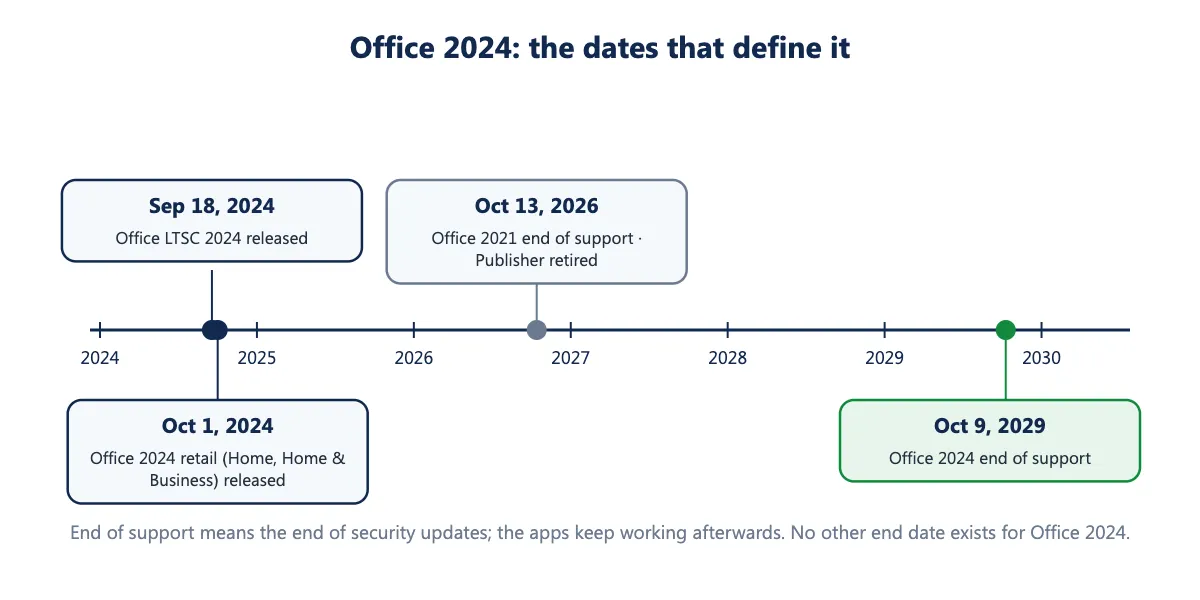
| Office LTSC 2024 (Professional Plus, Standard) released | September 18, 2024 |
| Office 2024 (Home, Home & Business) released | October 1, 2024 |
| Office 2021 and Office LTSC 2021 end of support | October 13, 2026 (passed) |
| Publisher end of life | October 2026 |
| Office 2024 and Office LTSC 2024 end of support | October 9, 2029 |
Office 2024 follows Microsoft’s fixed lifecycle policy: five years of support from release, with no extended support phase. “End of support” means the end of security updates, not the end of the software; Word, Excel and the rest keep opening, editing and saving files after October 9, 2029. Microsoft lists no other end-of-life date for Office 2024; if you see October 29, 2029 or any other day quoted, it is a mistake.
Office 2024 vs Office 2021: is it worth upgrading?
Office 2021 reached end of support on October 13, 2026, so anyone still on it is now running without security fixes. That, rather than any single feature, is the reason to move. Beyond it, the Excel functions and dynamic charts are the changes most people feel day to day; Cameo and Recording Studio matter if you present; the rest is refinement. One thing is lost in the move: Office 2021 Professional Plus included Publisher and Office 2024 does not. Our Office 2021 vs Office 2024 comparison goes line by line, and Office 2021 end of support explains what changed on the date.
Frequently asked questions
Is Office 2024 a one-time purchase? Yes. Every Office 2024 edition is a perpetual license paid once, with security updates until October 9, 2029 and no feature updates. Microsoft 365 is the subscription alternative.
Does Office 2024 have Copilot? No, and it will not be added. Copilot is a Microsoft 365 feature.
Does Office 2024 include Teams? Teams is not preinstalled. It is a free separate download from Microsoft and works independently of Office.
Which Excel functions are new in Office 2024? TEXTBEFORE, TEXTAFTER, TEXTSPLIT, VSTACK, HSTACK, TOROW, TOCOL, WRAPROWS, WRAPCOLS, TAKE, DROP, CHOOSEROWS, CHOOSECOLS and EXPAND, plus the IMAGE function and dynamic charts.
Can Office 2024 open files from Office 2021 and Microsoft 365? Yes. The file formats are unchanged. The exception is a workbook that uses functions Excel 2024 lacks (GROUPBY, PIVOTBY, Python), which shows errors in those cells.
When does Office 2024 stop working? It does not stop. Microsoft’s support ends October 9, 2029; the apps continue to run afterwards without security updates.
What is the difference between Office 2024 and Office LTSC 2024? Office LTSC 2024 is the volume-licensed release (Professional Plus and Standard). “Office 2024” is the retail release (Home, Home & Business). Same app versions and the same end-of-support date.
Sources
- Microsoft Support, “What’s new in Office 2024 and Office LTSC 2024”: https://support.microsoft.com/topic/baadecbe-a8fc-4435-8cb8-70e93fd08b56
- Microsoft Learn, “Overview of Office LTSC 2024”: https://learn.microsoft.com/en-us/office/ltsc/2024/overview
- Microsoft Learn, “Office LTSC 2024 lifecycle”: https://learn.microsoft.com/en-us/lifecycle/products/office-ltsc-2024
- Microsoft Learn, “Office 2024 lifecycle”: https://learn.microsoft.com/en-us/lifecycle/products/office-2024
- Microsoft Learn, “Office LTSC 2021 lifecycle”: https://learn.microsoft.com/en-us/lifecycle/products/office-ltsc-2021
- Microsoft Support, “Microsoft Publisher will no longer be supported after October 2026”: https://support.microsoft.com/en-us/office/microsoft-publisher-will-no-longer-be-supported-after-october-2026-ee6302a2-4bc7-4841-babf-8e9be3acbfd7
- Microsoft, “Get started with Office 2024” (retail edition contents): https://www.microsoft.com/en-us/microsoft-365/get-started-with-office-2024