Office LTSC Professional Plus 2024 is Microsoft’s name for the volume-licensed, one-time-purchase edition of Office 2024 that most sellers, including Kymakers, list as “Office 2024 Professional Plus”. If you have just seen “LTSC” in a configuration file, on the File › Account screen, or in a product listing and wondered whether you are getting a different or lesser product, the short answer is no: it is the same Word, Excel, PowerPoint, Outlook, OneNote and Access, delivered through Microsoft’s long-term servicing channel instead of a subscription. This article explains what the channel is, how LTSC differs from Microsoft 365 Apps and from the retail Office 2024 editions, how it installs and activates, and what the “preview has expired” message means.
Key takeaways
- LTSC = Long-Term Servicing Channel. The feature set is fixed at release; Microsoft ships security and quality updates until October 9, 2029 and no new features.
- Office LTSC Professional Plus 2024 includes Access, Excel, OneNote, Outlook, PowerPoint and Word. No Publisher, no preinstalled Teams.
- It installs with the Office Deployment Tool (Product ID ProPlus2024Volume, channel PerpetualVL2024) and activates with a product key; no Microsoft account is required.
- It does not have real-time co-authoring, Copilot or other cloud-backed Microsoft 365 features. That is the trade for a one-time price.
- “Office LTSC Professional Plus 2024 Preview” was a pre-release build that has expired; it cannot be activated and should be replaced with the released version.
Contents
- What “LTSC” means
- LTSC Professional Plus 2024 vs Microsoft 365 Apps
- LTSC vs the retail Office 2024 editions
- What is included
- How it installs and activates
- How long it is supported
- “Office LTSC Professional Plus 2024 Preview has expired”
- What activation does and does not tell you about the license
- Frequently asked questions
- Sources
What “LTSC” means
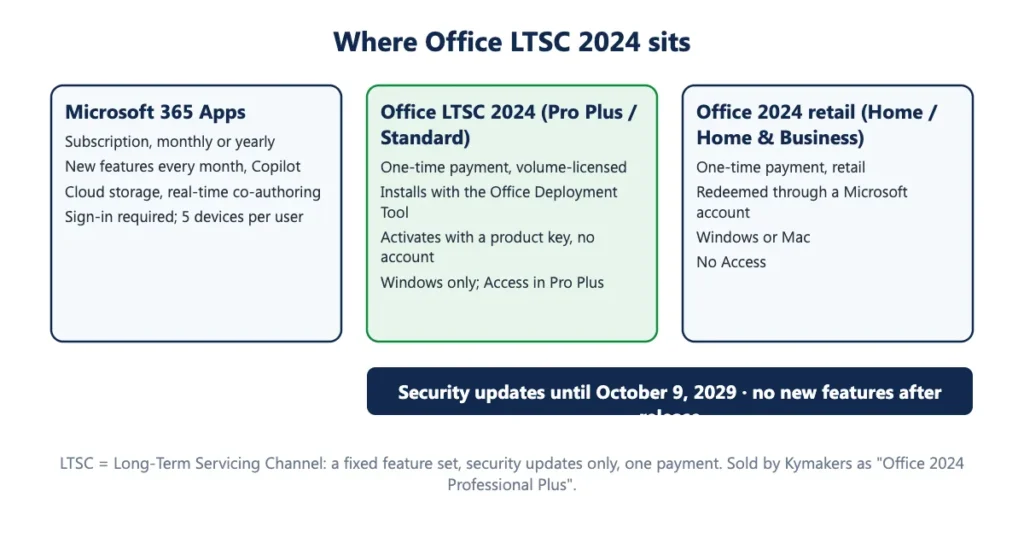
Microsoft ships Office in two ways. Microsoft 365 Apps is updated continuously: new features arrive every month and the product is a subscription. The Long-Term Servicing Channel is the opposite model: a release is frozen at launch and then serviced with security and reliability fixes for a fixed period. Microsoft’s own description of Office LTSC 2024 is that it “doesn’t receive any new features” and, unlike Microsoft 365 Apps, “doesn’t receive feature updates after launch”. Microsoft positions it for devices that cannot be connected to the cloud, regulated environments, and anyone who wants to pay once.
Windows has the same split: Windows 11 Enterprise LTSC and Windows 10 Enterprise LTSC are the long-term servicing editions of Windows, and our Windows 10 LTSC 2021 and Windows 11 LTSC articles cover them. Office LTSC 2024 is the Office counterpart, and it is supported on both of those Windows editions as well as on standard Windows 11.
So “LTSC” on your screen is not a trial, a volume-only restriction that stops a single buyer using it, or a cut-down edition. It is the servicing model that makes a perpetual license possible.
LTSC Professional Plus 2024 vs Microsoft 365 Apps
| Office LTSC Professional Plus 2024 | Microsoft 365 Apps | |
|---|---|---|
| Price model | One-time | Monthly or yearly subscription |
| Feature updates | None after release | Continuous |
| Security updates | Until October 9, 2029 | While subscribed |
| Real-time co-authoring, Copilot, cloud-backed security and compliance | Not included | Included (varies by plan) |
| Access | Included | Included in most plans on Windows; no Mac version |
| Installs per license | One PC (single key) | Up to five devices per user |
| Account | Product key; no Microsoft account needed | Microsoft or work account sign-in required |
| What happens when you stop paying | Nothing; you never pay again | Apps fall to reduced functionality |
Microsoft’s overview page is explicit about the gap: LTSC users “don’t have access to real-time collaboration, AI-driven automation, or advanced security and compliance tools”. If you need those, buy the subscription. If you need the desktop apps on one PC, LTSC is the lower-cost route over any period beyond the first year or two. The numbers are in Office one-time purchase vs Microsoft 365.
LTSC vs the retail Office 2024 editions
Microsoft also sells Office 2024 at retail as Office Home 2024 and Office Home & Business 2024. Those are perpetual too, and share the fixed-feature model, but they differ in three ways from the LTSC editions: they do not include Access; they are redeemed and installed through a Microsoft account from Microsoft’s setup site rather than with the Deployment Tool; and they are available for macOS. Office LTSC Professional Plus 2024 and Office LTSC Standard 2024 are Windows-only (Microsoft offers a separate Office LTSC Standard for Mac 2024 to volume customers, without Access).
In day-to-day use the apps are the same 2024 versions. Our Office 2024 edition comparison has the full table and a decision guide.
What is included
Microsoft’s list for Office LTSC Professional Plus 2024: Access, Excel, OneNote, Outlook, PowerPoint and Word, with Skype for Business available as an optional install during setup. Two absences are deliberate. Publisher is not included with Office LTSC 2024, because Microsoft retired Publisher in October 2026 (support for the perpetual version ended with Office LTSC 2021). Microsoft Teams is not preinstalled but is a separate free download. Office LTSC Standard 2024 is the same suite without Access.
The 2024 release added, among other things, dynamic charts and the IMAGE function in Excel together with fourteen new text and array functions, Cameo and recording improvements in PowerPoint, better search in Outlook, improved inking in OneNote, and a Dataverse connector in Access; our article on what is new in Office 2024 covers each change.
How it installs and activates
Office LTSC 2024 is a Click-to-Run product installed with Microsoft’s free Office Deployment Tool. A configuration file names the product (ProPlus2024Volume), the channel (PerpetualVL2024), the architecture and language, and carries your product key in the PIDKEY attribute; two commands download the files from Microsoft and install them. On first launch the apps activate online with that key. There is no Microsoft account requirement, which is one reason small businesses prefer this edition. The step-by-step procedure, with the configuration file and the errors to expect, is in our Office 2024 Professional Plus install guide.
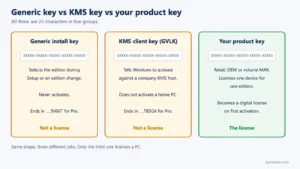
Volume editions of Office can activate in two ways: with a Multiple Activation Key, where each PC contacts Microsoft’s activation service directly, or through an organization’s Key Management Service host using Microsoft’s published generic client keys. The key you buy for one PC is used in the first way. Entering a KMS client key by mistake on a home PC produces error 0xC004F074, because there is no KMS host to answer; our guide to error 0xC004F074 explains the fix.
How long it is supported
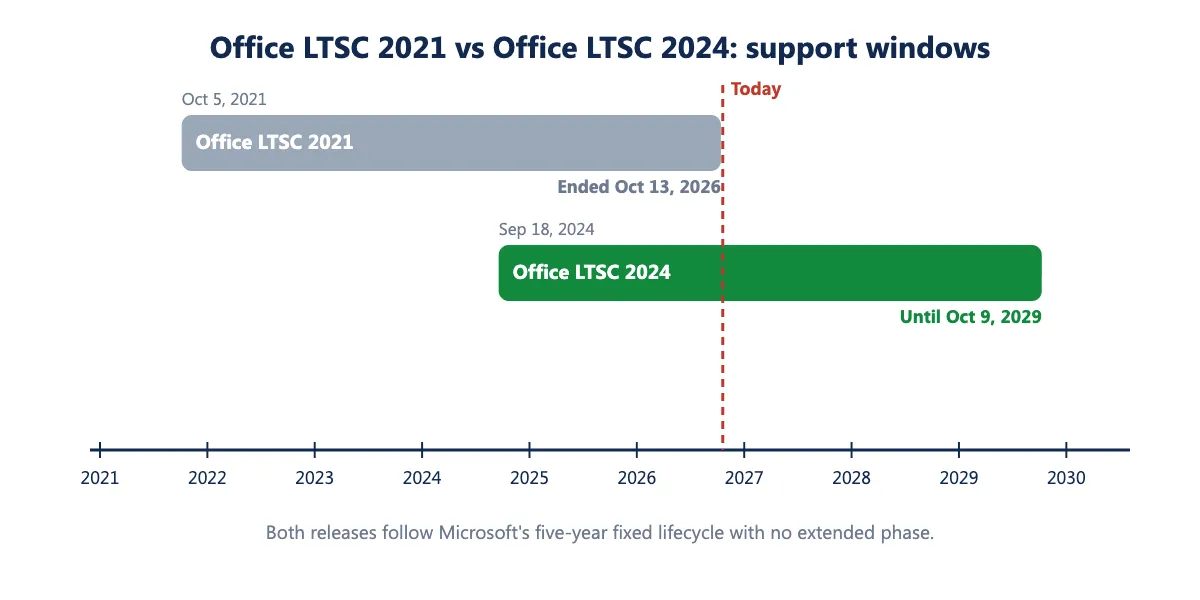
Microsoft’s lifecycle policy for Office LTSC 2024 is fixed: five years of support from the September 18, 2024 start date, ending on October 9, 2029, with no extended support phase. The retail Office 2024 editions end on the same date. After that the apps continue to open, edit and save files, but no further security fixes are released, which is the point at which most organizations plan the next upgrade. The previous release, Office LTSC 2021, reached that point on October 13, 2026; our article on Office 2021 end of support describes what changed and what did not.
“Office LTSC Professional Plus 2024 Preview has expired”
Before the October 2024 release, Microsoft offered a free commercial preview of Office LTSC 2024. Preview builds were time-limited and have since expired, so a PC still running one shows a banner that the preview has expired, and no product key will activate it: there is nothing to activate, because the preview was never a licensed product. The fix is to uninstall the preview (Settings › Apps, then Microsoft’s Office uninstall support tool if anything remains), install the released version with the Deployment Tool, and activate with a genuine key. If you bought a key for the preview build from someone, that is the reason it never worked.
What activation does and does not tell you about the license
A successful activation tells you that Microsoft’s servers accepted the key for this product on this PC. It does not tell you what the license permits: how many PCs, whether it can move to a new computer, whether it was sold to you under terms the original licensee was allowed to pass on. Those are properties of the license, and a seller should state them in writing rather than let the activation screen imply them. Kymakers states what each order covers in the delivery email: the single key covers one PC, the 5 PC pack is one key for up to five PCs, and keys that stop working through no fault of yours are replaced under our refund and replacement policy. Our article on whether cheap Microsoft license keys are safe to buy lists what to check about any seller, and how it works at Kymakers explains the delivery and support process.
Frequently asked questions
Is Office LTSC Professional Plus 2024 the same as Office 2024 Professional Plus? Yes. “Office LTSC Professional Plus 2024” is Microsoft’s product name; “Office 2024 Professional Plus” is the everyday name sellers use. The File › Account screen shows Microsoft’s name.
Is Office LTSC 2024 a lifetime license? It is a perpetual license: you pay once and the software keeps working. Microsoft’s security updates end on October 9, 2029; the apps continue to run after that.
Can an individual use Office LTSC, or is it for businesses only? Microsoft designs LTSC for organizations, but a single PC installs and activates the same way. What matters is that the key you buy is sold to you legitimately; see the section on licenses above.
Does it work offline? Yes. Installation and activation need an internet connection; afterwards the apps run offline. Activation with a Multiple Activation Key is a one-time event on that PC and does not need periodic renewal (unlike KMS activation, which organizations renew against their own server).
Can I install it on Windows 10? Microsoft’s supported platforms for Office LTSC 2024 are Windows 11, Windows 11 LTSC 2024, Windows 10 LTSC 2019 and 2021, and Windows Server 2022 and 2025. Windows 10 Home and Pro reached end of support on October 14, 2025 and are not on that list; the installer generally runs, but it is an unsupported configuration.
Will it get Copilot later? No. Microsoft states that Office LTSC 2024 receives no new features after release, and Copilot is a Microsoft 365 feature.
Sources
- Microsoft Learn, “Overview of Office LTSC 2024”: https://learn.microsoft.com/en-us/office/ltsc/2024/overview
- Microsoft Learn, “Deploy Office LTSC 2024”: https://learn.microsoft.com/en-us/office/ltsc/2024/deploy
- Microsoft Learn, “Office LTSC 2024 lifecycle”: https://learn.microsoft.com/en-us/lifecycle/products/office-ltsc-2024
- Microsoft Learn, “Office LTSC 2021 lifecycle”: https://learn.microsoft.com/en-us/lifecycle/products/office-ltsc-2021
- Microsoft Learn, “What’s new in Office LTSC 2024”: https://learn.microsoft.com/en-us/office/ltsc/2024/whats-new
- Microsoft Support, “System requirements for Microsoft 365 and Office”: https://support.microsoft.com/topic/5e59b928-c35c-4b7f-806d-8b44c23d2eb9
- Microsoft Support, “Microsoft Publisher will no longer be supported after October 2026”: https://support.microsoft.com/en-us/office/microsoft-publisher-will-no-longer-be-supported-after-october-2026-ee6302a2-4bc7-4841-babf-8e9be3acbfd7