Written by: Kymakers Support Team · Reviewed by: Kymakers Technical Team Last updated: July 2026 · Applies to: Windows 10 Home, Pro, Education, Enterprise Difficulty: Beginner · Estimated time: 5–10 minutes
To activate Windows 10 with a product key, open Settings → Update & Security → Activation → Change product key, enter your 25-character key, and click Next — activation finishes in under a minute with an internet connection. That’s the core of how to activate Windows 10. Below is the full walkthrough, the fix for every common activation error, one important note about Windows 10’s support ending, and how to get a genuine key without being scammed.
⚠️ Read this first: Windows 10 support has ended
Windows 10 reached end of support on October 14, 2025. You can still activate it, and it still runs — but it no longer receives free security updates. Activating a genuine copy is fine for now; just know that upgrading to Windows 11 (free from a genuine Windows 10 license on eligible hardware) is the longer-term move. This guide covers how to activate Windows 10 today, and points you to the upgrade when you’re ready.
Table of Contents
- What you need before you start
- Step-by-step: how to activate Windows 10
- How to activate Windows 10 after a hardware change
- How to fix activation errors
- Windows 10 activated — should you upgrade to 11?
- Where to get a genuine, cheap key
- FAQ
What You Need Before You Start
Before you activate Windows 10, get three things ready.
A genuine 25-character product key in the format XXXXX-XXXXX-XXXXX-XXXXX-XXXXX, from your purchase — Microsoft, a retailer, or a licensed reseller.
The right key for your edition. A Windows 10 Pro key activates Pro, not Home. Check which edition you have under Settings → System → About first, so you don’t hit a mismatch.
An internet connection. Activation contacts Microsoft’s servers to validate the key. Phone activation is a fallback, but online is faster and is what this guide assumes.
One check worth doing first: you may already be activated. Some PCs carry a digital license tied to the hardware, so look at Settings → Update & Security → Activation before buying anything.
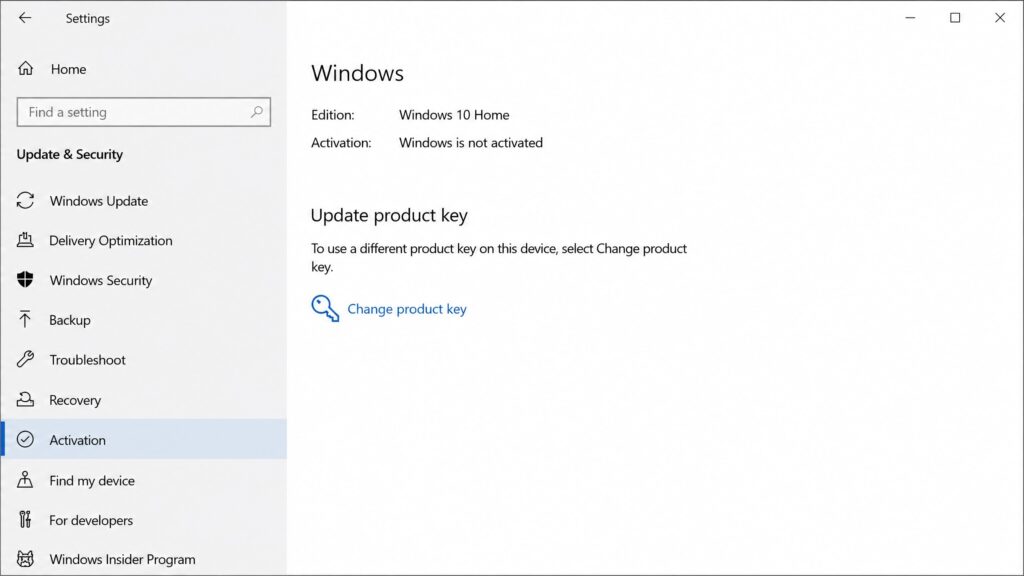
Step-by-Step: How to Activate Windows 10
Here’s how to activate Windows 10 with a product key, start to finish.
- Open Settings. Press
Windows + I, or click Start → Settings. - Go to Update & Security → Activation. Your current activation state shows at the top.
- Click “Change product key.” (If Windows isn’t activated, you’ll also see an “Activate” option leading to the same place.)
- Enter your 25-character product key. Type or paste it carefully; Windows checks the format as you go.
- Click Next, then Activate.
- Wait for confirmation — within a minute you should see “Windows is activated with a digital license” or “with a product key.”
To confirm it held, return to Settings → Update & Security → Activation, or run slmgr /xpr in Command Prompt to see the activation status. That’s all there is to how to activate Windows 10 in the normal case.
How to Activate Windows 10 After a Hardware Change
A common reason people search how to activate Windows 10 is that it was activated, then deactivated after replacing a part — usually the motherboard or drive.
Windows ties a digital license to your hardware. Change enough of it and the license can drop. The fix is the activation troubleshooter:
- Go to Settings → Update & Security → Activation.
- Click Troubleshoot (it appears when Windows detects an activation problem).
- Choose “I changed hardware on this device recently.”
- Sign in with the Microsoft account linked to your license and select the device.
This re-links the license to the new hardware — which is why linking your license to a Microsoft account before a hardware change saves trouble. If the troubleshooter can’t fix it, enter your product key manually as above.
How to Fix Activation Errors
If activation fails, the cause is usually one of these — not always a bad key.
Check your connection. The most common failure is activation not reaching Microsoft. Drop any VPN, and on a work network try from home — corporate firewalls often block activation.
Check the date and time. A wrong clock breaks the certificate checks activation depends on. Settings → Time & language → Date & time → turn on “Set time automatically,” then sync.
Confirm the key matches the edition. A Pro key won’t activate Home. Fix the mismatch by using the right key or installing the right edition.
Run the troubleshooter. Settings → Update & Security → Activation → Troubleshoot clears many errors on its own.
If you see “blocked,” “invalid,” or code 0xC004C060, the key itself is the problem — Microsoft’s guidance is that these mean it’s invalid, stolen, or already in use, and to contact the seller for a refund. No local fix helps; you need a genuine key. Our full breakdown of activation error codes covers each one.
Windows 10 Activated — Should You Upgrade to 11?
Once you know how to activate Windows 10 and it’s done, there’s one more decision worth making, because of that October 2025 support deadline.
If your hardware meets the Windows 11 requirements (TPM 2.0, Secure Boot, supported CPU), the upgrade is free and your activated Windows 10 license carries straight over — no new key needed. Given that Windows 10 no longer gets security updates, that’s the sensible path for most people who can take it.
If your hardware can’t run Windows 11, activating Windows 10 keeps the machine fully functional for now. Just treat it as a bridge, not a permanent plan, and be cautious with what that PC does online.
Where to Get a Genuine, Cheap Key
If you need a key to activate Windows 10 — a clean install, a rebuild, or a machine that lost its license — the goal is genuine and affordable, not just cheap. A $3 key from an anonymous marketplace often activates once and dies weeks later. The rule for a safe buy: the seller states the license type, guarantees replacement if the key fails, and offers activation support.
Kymakers is built to that standard — genuine Windows 10 Pro and Windows 10 Home keys with a stated license type, instant delivery, a replacement guarantee, and activation support. And if you decide to move up, genuine Windows 11 Pro keys are there too. For more on spotting a real key, see our guide on where to buy a Windows key.
FAQ
How do I activate Windows 10 with a product key? Settings → Update & Security → Activation → Change product key → enter your 25-character key → Next → Activate. It completes in under a minute online.
How do I know if Windows 10 is already activated? Go to Settings → Update & Security → Activation. It will say “Windows is activated with a digital license” or “with a product key.” You can also run slmgr /xpr.
Can I still activate Windows 10 after end of support? Yes. Activation servers still work and genuine keys still activate. Windows 10 just no longer receives free security updates after October 14, 2025.
Why won’t my Windows 10 product key activate? Usually connection, clock, or edition mismatch — not the key. Check those first. A “blocked” or “invalid” code means the key itself needs replacing.
Is it better to activate Windows 10 or upgrade to 11? If your hardware supports Windows 11, upgrading is better long-term — it’s free from a genuine Windows 10 license and stays supported. If not, activating Windows 10 keeps the PC working for now.
Is it safe to buy a cheap Windows 10 key online? Yes, from a seller that states the license type and guarantees the key. Avoid suspiciously cheap keys from anonymous sellers — they often get revoked after activating.
CTA
Need a genuine key to activate Windows 10? Kymakers supplies Windows 10 Pro and Windows 10 Home keys with instant delivery, a stated license type, replacement guarantee, and activation support — and genuine Windows 11 keys when you’re ready to upgrade.
Official reference: Activate Windows — Microsoft Support