Managing corporate IT infrastructure requires a meticulous balance between hardware budget management and enterprise data security. If your company is currently running active business workloads on legacy software, the clock is ticking loudly. Because of Microsoft’s strict Fixed Lifecycle Policy, key milestones have already passed, making a strategy for the server 2019 end of life an immediate priority for modern IT administrators.
Failing to plan around the upcoming server 2019 end of life timeline exposes your enterprise to unexpected compliance breakdowns, severe application security vulnerabilities, and prolonged operational server downtime.
In this comprehensive guide, we break down the definitive support deadlines, outline the operational risks of sticking with an obsolete platform, and help you map out a seamless upgrade path to protect your network from the impacts of the server 2019 end of life
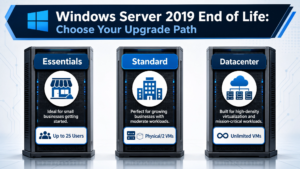
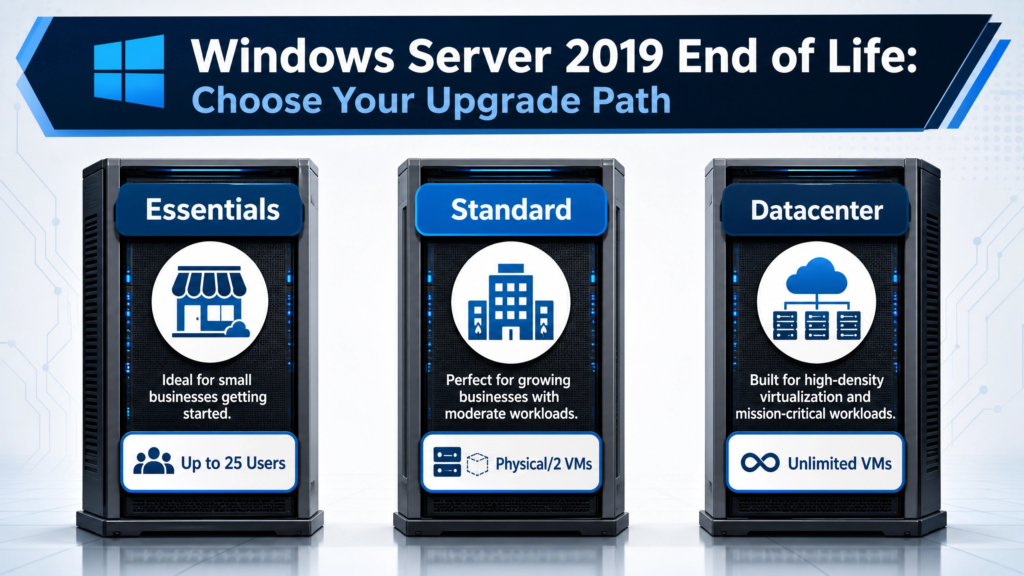
Caption: Planning your infrastructure migration strategy ahead of server 2019 end of life.
Table of Contents
-
Windows Server 2019 Editions: Core Differences Between Essentials, Standard, and Datacenter
-
How the Support Lifecycle Impacts Each Windows Server 2019 Type
-
Edition-Specific Security and Financial Risks of Delayed Migration
-
Your 3 Best Upgrade Paths Before server 2019 end of life.
Windows Server 2019 Editions: Core Differences Between Essentials, Standard, and Datacenter
To properly plan your migration strategy, you cannot treat all setups the same way. The impact of the server 2019 end of life. depends heavily on which specific tier your organization is running, as each edition serves a completely different scale of infrastructure:
-
Windows Server 2019 Essentials: Tailored specifically for small businesses with up to 25 users and 50 devices. It runs as a simple, affordable entry-level option that does not require Client Access Licenses (CALs) but lacks advanced virtualization capabilities.
-
Windows Server 2019 Standard: Built for physical or minimally virtualized deployments. This edition allows you to run up to two virtual machines (VMs) or Hyper-V containers per license core, making it the most common middle-tier option for standard office servers.
-
Windows Server 2019 Datacenter: Engineered for highly virtualized environments, corporate datacenters, and cloud setups. It grants unlimited virtual machines alongside elite features like software-defined storage (Storage Spaces Direct) and shielded VMs.
How the Support Lifecycle Impacts Each Windows Server 2019 Type
Microsoft applies its standard Long-Term Servicing Channel (LTSC) 10-year timeline across all tiers equally. Whether you operate a single Essentials box or a massive cluster of Datacenter hosts, the roadmap toward the final server 2019 end of life moves at the exact same pace through two distinct phases:
The Mainstream Support Phase (Ended January 9, 2024)
During this first 5-year block, Microsoft provided feature design additions, system enhancements, and non-security bug fixes to all editions. This development window is now permanently closed for Server 2019.
The Extended Support Phase (Active Until January 9, 2029)
We are currently in this final safety window. For all editions, Microsoft still creates monthly security patches to block global exploits, and your IT department can still open paid technical support tickets. However, when January 2029 arrives, full server 2019 end of life. takes effect, and all maintenance stops instantly.
Your 3 Best Upgrade Paths Before server 2019 end of life.
The secret to a stress-free transition is executing a proactive migration long before an emergency forcing event compromises your operations. To navigate the server 2019 end of life., you have three primary strategies to choose from:
Path A: In-Place Upgrade to Windows Server 2022 or 2025
If your underlying physical host hardware or virtualization layer is highly performant, you can perform an in-place upgrade straight to Windows Server 2022 or Windows Server 2025. This process modernizes the underlying core system files while preserving your active server roles, application settings, and local storage data intact.
Path B: Clean Installation and Data Migration
For complex systems like primary domain controllers, database structures, or outdated application setups, a clean install is the preferred industry standard. By deploying a completely fresh instance of Server 2022 or 2025 on a new virtual machine or hardware host, you can cleanly migrate your configurations over, permanently leaving legacy system bloat and registry errors behind.
Path C: Lift-and-Shift to Microsoft Azure
Microsoft offers robust technical and financial incentives for migrating legacy environments directly into the cloud to beat the server 2019 end of life. Moving your server workloads over to Azure Virtual Machines can unlock extended security maintenance advantages and eliminates local server hardware replacement cycles entirely.
Frequently Asked Questions
Does the server 2019 end of life date apply to Essentials, Standard, and Datacenter editions equally? Yes. The server 2019 end of life. roadmap and the final January 9, 2029 deadline apply universally to all foundational editions—including Essentials, Standard, and Datacenter. Regardless of your edition’s virtualization limits or size, security patches will stop on that day.
Can I upgrade directly from Windows Server 2019 Standard to Windows Server 2025 Datacenter? Yes. Microsoft supports cross-edition upgrades during the migration process. As you transition away from the server 2019 end of life, your IT team can execute an in-place or clean upgrade path that simultaneously shifts your environment from Standard to Datacenter to unlock unlimited virtual machines (VMs).
Will my current business applications stop running on the exact day support ends? No. Your local operating system and its custom hosted software will continue executing exactly as they do today. However, the complete absence of new security definitions puts the entire environment at severe risk.
Are Extended Security Updates (ESU) available for purchase after 2029? Microsoft generally offers a paid ESU program for up to three years post-EOL to act as an emergency migration buffer. However, because these annual per-server licensing fees scale aggressively over time, they are a temporary bridge rather than a sustainable long-term strategy for managing the server 2019 end of life.
Are you beginning to map out your infrastructure migration plan to handle the server 2019 end of life? Explore our verified Windows Server volume licensing offers to secure genuine, cost-effective upgrade keys for your company’s upcoming transition.