Microsoft Visio 2024 Professional Product Key – Lifetime License 1 PC Windows

Original price was: $74.00.Current price is: $14.99.

Buy a genuine Microsoft Visio 2024 Professional product key — lifetime license for 1 Windows PC. Create professional diagrams, flowcharts, org charts, network diagrams, floor plans, and process maps with an extensive library of shapes and templates.

Key Features

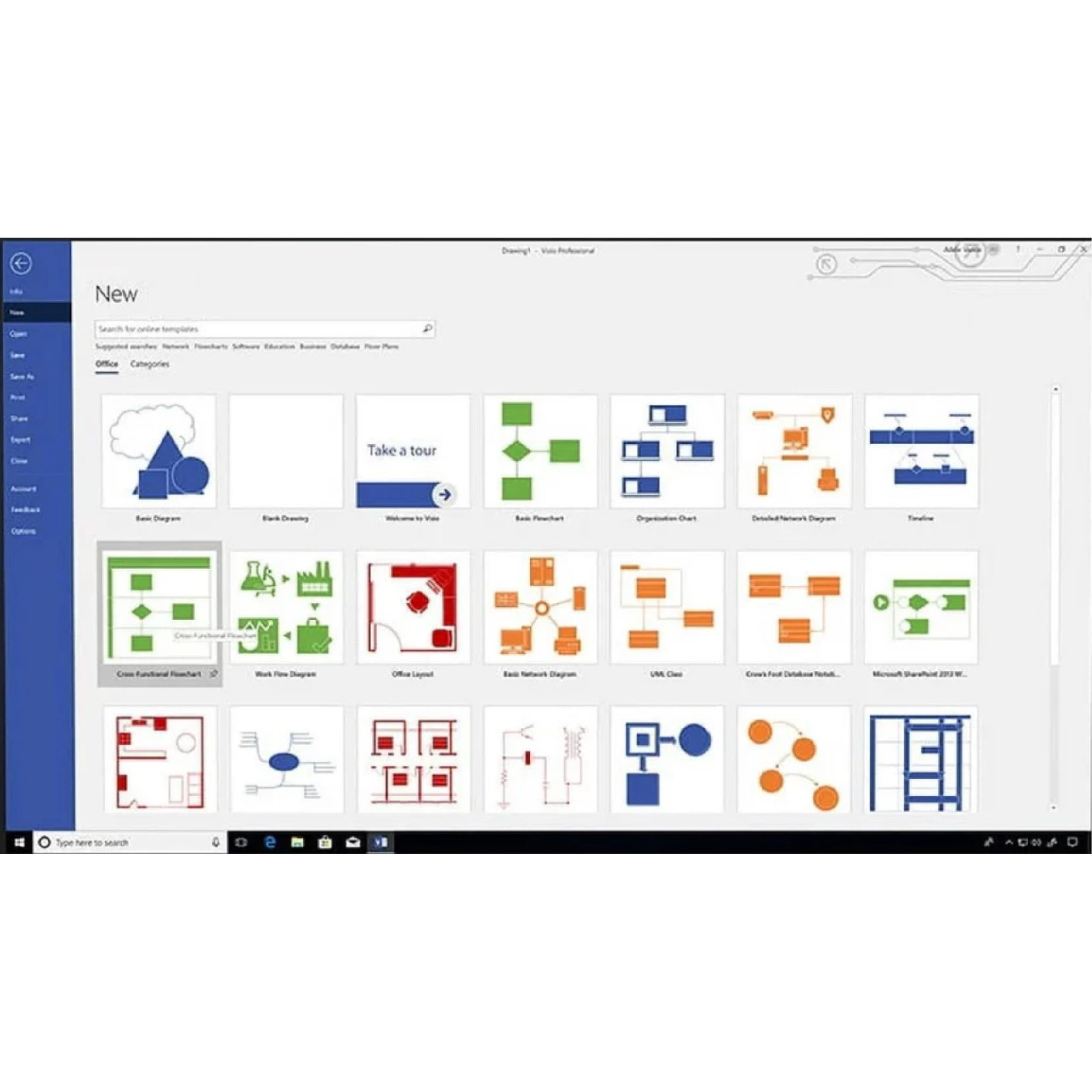
80+ Templates Flowcharts, org charts, floor plans, network maps, and more
Real-Time Co-authoring Multiple users can edit the same diagram simultaneously
Data Linking Link diagrams to Excel, SQL Server, and SharePoint data
Diagram Validation Validate against rules to ensure accuracy and compliance
AutoCAD Import Import and work with AutoCAD drawings natively
Advanced Shapes & Styles Thousands of shapes, stencils, and customization options

License Details

Delivery License key + Microsoft download link by email within seconds
License Type Lifetime — one-time purchase, no subscription
Product Microsoft Visio 2024 Professional — standalone license
Compatible OS Windows 10 and Windows 11
Platform Windows only — not available for Mac
Devices 1 PC — single device lifetime license
Language Globally valid — any language version of Windows
Guarantee 180-day money-back — working key or full refund
Product Type business productivity software and graphics/illustration software

How to Activate

1
Check your email Your license key and official Microsoft download link arrive within seconds of purchase.
2
Visit setup.office.com Sign in with your Microsoft account and enter your 25-character product key to redeem the Visio license.
3
Download and install Download Visio 2024 Professional directly from Microsoft’s servers. Activation completes automatically during installation.

System Requirements

Operating System Windows 10 or Windows 11 — 64-bit only
Processor 1.6 GHz, 2-core minimum
RAM 4 GB minimum (8 GB recommended for large diagrams)
Storage 4 GB available disk space
Internet Required for activation — offline use after activation
Not Supported Mac, Android, Chromebook, Windows 7/8/8.1

Ideal For

IT Administrators Network diagrams, server topology, and infrastructure maps
Business Analysts Process maps, BPMN diagrams, and cross-functional flowcharts
Software Developers UML diagrams, system architecture, and entity-relationship models
Facilities & Operations Floor plans, office layouts, and space planning
Engineers P&ID schematics, mechanical designs, electrical diagrams
Project Managers Process flows and org charts for team and stakeholder communication

Our Guarantee

Genuine Key
Activates on Microsoft servers
Instant Delivery
Key in your inbox in seconds
180-Day Refund
Working key or full refund
Global License
Any country, any language

Frequently Asked Questions

Is Visio included in Microsoft 365?
No. Microsoft Visio is not included in any Microsoft 365 or Office subscription — it must always be purchased separately. This listing is a standalone one-time purchase license with no subscription fees.
Does Visio 2024 work on Mac?
No. Microsoft Visio 2024 is a Windows-only application. There is no Mac version available as a standalone desktop application.
What is the difference between Visio Standard and Visio Professional?
Visio Professional adds data linking (connecting diagrams to live data from Excel, SQL Server, or SharePoint), sub-process diagrams, more advanced diagram types, and diagram validation rules. This listing is the Professional edition — the most capable standalone version.
Should I buy Visio standalone or the Office + Visio + Project bundle?
If you only need Visio, this standalone license is the right choice. If you also need Office 2024 Pro Plus and Project 2024, our Office 2024 Pro Plus + Visio + Project bundle gives you all three at a lower total cost than buying separately.
Is this a lifetime license?
Yes. One-time purchase, permanent license. No renewal fees.
What if the key does not work?
Contact us at Support@kymakers.com. We replace your key or issue a full refund within 24 hours — guaranteed.

Buy Microsoft Visio Professional 2024

Microsoft Visio Professional 2024 enables you to create professional and versatile diagrams that simplify complex information. Designed to work seamlessly with other Microsoft applications, Visio Professional 2021 is the perfect tool for creating detailed and accurate diagrams with ease.

iagram Types You Can Create

Diagram Type Common Use Case
Flowcharts Business processes, decision trees, workflows
Org Charts Company structures, reporting hierarchies
Network Diagrams IT infrastructure, server topology, cloud architecture
Floor Plans Office layouts, building maps, space planning
Engineering Diagrams P&ID schematics, mechanical and electrical designs
UML & BPMN Software architecture, business process modeling
Cross-Functional Flowcharts Multi-department process maps with swimlanes

Key Features

  • Intuitive Diagramming: Create detailed and professional diagrams with an intuitive interface that makes diagramming easy for all skill levels.
  • Variety of Templates: Access a wide range of built-in templates and shapes to create flowcharts, organizational charts, network diagrams, floor plans, engineering designs, and more.
  • Collaboration Tools: Collaborate with team members in real-time, allowing multiple people to work on a diagram simultaneously.
  • Data Linking: Link diagrams to data from multiple sources, including Excel, SQL Server, and SharePoint, to provide real-time updates and insights.
  • Advanced Shape and Style Options: Utilize advanced shape and style options to customize your diagrams to meet specific needs and standards.
  • Diagram Validation: Validate your diagrams against predefined rules to ensure accuracy and compliance with industry standards.
  • Integration with Microsoft Tools: Seamlessly integrate with other Microsoft applications, such as Office, Teams, and SharePoint, for enhanced productivity and collaboration.
  • Enhanced AutoCAD Support: Import and work with AutoCAD drawings with improved support and functionality.
  • Accessibility Features: Ensure your diagrams are accessible to all users with improved accessibility features.

Benefits

    • Improved Visualization: Simplify complex information with clear and professional diagrams that enhance understanding and communication.
    • Enhanced Collaboration: Work together with team members in real-time, ensuring everyone is on the same page and contributing to the project.
    • Data-Driven Insights: Link your diagrams to data sources to provide real-time updates and insights, making your diagrams dynamic and informative.
    • Customization: Customize your diagrams to meet specific needs with advanced shape and style options.

Your Cart (0)
Empty Cart Your Cart is Empty!

It looks like you haven't added any items to your cart yet.

Browse Products
Subtotal
Shipping & taxes calculated at checkout.
$0.00
Checkout Now